NetShop ISP Confirms Multiple Deals in iFX EXPO Dubai
Industry-leading cloud & infrastructure solutions provider, NetShop ISP, has signed multiple deals for private cloud hosting and Managed Colocation services during the iFX EXPO that took place on the 19th and 20th of May in Dubai.
The world’s largest Finance & Technology expo welcomed thousands of participants from the fintech world, including Forex brokers, CRM Development agencies, Affiliates, Liquidity Providers and Technology Providers.
“It was exciting to attend an offline event after such a long time. We have had the opportunity to meet with existing partners and customers in the Forex industry, as well as confirm a lot of new deals mainly for our world-class Forex VPS solution. A lot of Brokers and CRM Development agencies agreed to sign up with us and integrate our solution into their own trading platform and CRMs. It has been a very busy Q1 and Q2, and i am proud to see our hard work paying off with such a game-changing product we have launched”, said Katerina Burtsava, Head of Sales at NetShop ISP.
About NetShop ISP’s Forex VPS Solution
The Forex VPS solution was first launched in 2010, where NetShop ISP was among very few hosting providers to offer Virtual servers for Forex trading purposes. Following several months of research & development, NetShop ISP announced the availability of a new version of its Forex VPS service that includes a powerful API for seamless white-label integration with any Forex Broker’s CRM.
Colocation Hosting is especially popular amongst organizations who wish to grow their in-house IT department, and therefore require a higher level of control over their hardware.
In this article we’ll take a closer look at Colocation Hosting, and in particular, the best Cyprus Colocation Hosting in 2021.
When it comes to choosing the optimal hosting solution for your business, there are various options to choose from and many factors that should be taken into consideration. Colocation Hosting is especially popular amongst organizations who wish to grow their in-house IT department, and therefore require a higher level of control over their hardware.
In this article we’ll take a closer look at Colocation Hosting, and in particular, the best Cyprus Colocation Hosting in 2021.
Best Cyprus Colocation Hosting plans 2021
What is Colocation Hosting
Often confused with Dedicated Server Hosting, Colocation Hosting is when companies rent space in data centers to house their own servers and equipment. Simply put, companies who opt for this service already have their own servers and are in charge of maintaining and managing them.
By opting for Colocation instead of keeping their servers internal, companies can take full advantage of the data centre’s benefits whilst keeping their costs down, and still having a very hands-on approach in terms of server control. For many, Colocation Hosting offers the best of both worlds – so let’s weigh up the benefits and take a look at what makes Cyprus great for offshore hosting.
Colocation Hosting in Cyprus
Cyprus is up there with the most popular offshore Colocation Hosting locations for a multitude of reasons. Situated in the heart of the EMEA region, Cyprus’ geographic location makes it ideal for offshore business activities.
The island is also extremely low risk from natural disasters, meaning power and internet connectivity will be the least of your concerns, and you can be rest assured that strong infrastructure is in place to handle any issues if they occur.
Apart from the location and safety, Cyprus is also a global business destination and hub for the Forex and iGaming industries, with an efficient taxation system that makes the country extremely attractive for businesses and investors.
For more information about Cyprus as an offshore hosting location, visit our website here.
Benefits of Colocation Hosting
Security
One of the biggest benefits of Colocation Hosting is the level of security it provides. Data centres have heightened security and precautionary measures in place to safeguard your servers, with strict protocols in place for access authorization – whilst also adhering to all of the necessary compliance regulations.
At NetShop ISP, all four of our state-of-the-art Cyprus data centers are monitored by 24x7x365 CCTV Security and 24/7 On-site Engineers.
Cost effective
The initial setup and operational costs of maintaining servers on your own premises can really add up. Your equipment needs to be stored in an optimal, temperature controlled environment, and the power and networking expenses do not come cheap. Opting for Colocation Hosting not only offers you the peace of mind of knowing that your servers are reliably housed, but also saves you money in the long run.
All of our Cyprus data centers are fully equipped with the latest electricity generators and cooling systems, offering the ideal hosting facilities at a reasonable price.
Performance
Colocation Hosting offers second to none performance and speeds that would not be achievable when hosting servers on-site. Direct connection to a hosting provider’s network guarantees exceptional speeds, low latency and a vaster range of connectivity options.
Our four carrier-neutral data centers in Cyprus offer you complete flexibility, reliability and a variety of bandwidth options – with access to major Internet Exchanges.
Colocation Hosting with NetShop ISP
We offer affordable, secure and reliable Colocation in Cyprus with a range of added benefits that will guarantee you a smooth hosting experience.
Our Colocation plans are scalable to your needs and we also offer various add-on services like Infrastructure Management and Hardware Firewalls. Moreover, we offer a hardware procurement service so that you don’t have to deal with multiple vendors or shipping & logistics on how to deliver your equipment in Cyprus.
For more information on our plans and services, please don’t hesitate to get in touch with our team.
NetShop ISP releases the Greek version of its Website and myNetShop Self-service Portal
NetShop ISP, a leading Data Center & Web Hosting provider, announces today the launch of the Greek version of its main website (https://netshop-isp.com.cy/el/) and myNetShop Self-service portal (https://my.netshop-isp.com.cy/).
Larnaca, Cyprus (20th May 2021) – NetShop ISP, a leading Data Center & Web Hosting provider, announces today the launch of the Greek version of its main website (https://netshop-isp.com.cy/el/) and myNetShop Self-service portal (https://my.netshop-isp.com.cy/).
Greek version of the NetShop ISP Website
The rebranded website, released in December 2020, offers a holistic user experience, reflecting the commitment of NetShop ISP towards a user-oriented customer service perspective.
“Through our Cyprus and global Data Centers infrastructure, we have been serving Greek customers since the first years of NetShop ISP’s launch. Due to the high demand of our services by businesses in Greece, we have always been providing pre-sales, technical consulting and after-sales support in Greek, through native speakers. The launch of the Greek version of our website and the myNetShop Portal, comes to fulfill a popular demand by existing customers of ours,” said CEO of NetShop ISP, Stefano Sordini.
What’s Next?
As per the recent expansion of its data centers infrastructure in Asia and the United States, NetShop ISP is committed to provide above and beyond cloud, infrastructure and web hosting services, backed by a 24/7 customer service and technical support in multiple languages.
How To Install GNOME Desktop (GUI) on Ubuntu Server 18.04
We show you the easiest way to install GNOME Desktop on your Ubuntu server 18.04, so you can manage it via GUI (Graphical User Interface) as if you are working on your personal computer.
Ubuntu 18.04 is one of the most popular Operating systems when purchasing a VPS or a Dedicated server. If you have purchased a VPS or Dedicated Server from NetShop ISP, or any other hosting company, then most likely the distribution installed is the Ubuntu Server 18.04 which means you will need to manage your server via terminal (CLI).
In this article we will show you the easiest way to install GNOME Desktop on your Ubuntu server, so you can manage it via GUI (Graphical User Interface) as if you are working on your personal computer.
Step 1. Check Pre-requisites
All you need is access on your Ubuntu server and have a user account with sudo privileges, or the root account itself.
Step 2. Update Ubuntu 18.04
Before we proceed with the GNOME Desktop installation, you need to update and upgrade your OS packages, including the kernel. Do it by typing the following commands:
sudo apt-get update -y
sudo apt-get upgrade -y
The “-y” parameter in the end means you will not be prompted to choose Y/n during the updates and upgrades process. It will consider “Yes” automatically and proceed further.
Once the execution of tasks is completed, reboot your server:
shutdown -r now
Step 3. Install GNOME
It’s time to proceed with the GNOME installation. As this will require a lot of packages with dependencies to be installed, we will use a special tool named tasksel. Tasksel is a tool available in Ubuntu and Debian distributions which helps to install multiple related packages with their dependencies, as a coordinated task.
To install Tasksel, login to your server after it has been rebooted and type this command:
sudo apt-get install tasksel -y
Once the installation completes, continue with the following command:
sudo tasksel
Upon issuing the above command, you will see the following screen. Scroll down in the list and select the “Ubuntu Desktop” option as indicated below.
Selecting Ubuntu Desktop for installation with Tasksel
By clicking “OK”, Tasksel will begin installing all necessary packages for the GNOME Desktop on your Ubuntu server.
Grab a coffee and allow it a couple of minutes until the installation completes. Then reboot your server again.
Once it’s up again, you will see the login screen by Ubuntu’s new LightDM Display Manager, as shown below.
LightDM Display Manager of Ubuntu Server GNOME Desktop
Congratulations! You have now GNOME Desktop GUI installed on an Ubuntu server 18.04!
Still Need Help?
If you are a NetShop ISP customer, then we can help further! Simply contact our Technical support team via ticket (https://my.netshop-isp.com.cy) and we can install GNOME Desktop on your Ubuntu server.
Day 1: iFX EXPO Dubai 2021 Opened its Doors to Forex and Fintech professionals
Today, 19th of May 2021, the world’s largest Fintech B2B Exhibition opened its doors to thousands of attendees and exhibitors from the Forex, Fintech and ICT industries. Meet with the NetShop ISP team during the 2 days of the event.
Today, 19th of May 2021, the world’s largest Fintech B2B Exhibition opened its doors to thousands of attendees and exhibitors from the Forex, Fintech and ICT industries.
NetShop ISP, an established Infrastructure and Technology Supplier, is participating at the iFX EXPO to showcase its world-class Forex VPS solution, meet with existing customers and partners, as well as connect with the industry’s professionals.
Let’s Meet!
It’s never too late to arrange a meeting with our team in Dubai.
[Video] How To Manage your cPanel Web Hosting via myNetShop Self-service portal
myNetShop self-service portal is a great tool to use to manage your cPanel web hosting account. Check out this 8-minute video to find out all functionality you can do from within our self-service portal.[Vv
myNetShop is an intuitive, purpose-built, self-service portal to manage your Web Hosting and Servers, communicate with our 24/7 customer service team and pay for your Invoices.
Whilst your shared web hosting account can be fully managed from the cPanel’s control panel interface, yet there are circumstances where the myNetShop portal can be useful to perform certain actions for your hosting account.
When Does myNetShop Come Handly for Hosting Management
1. Your IP address is blocked on cPanel server
One of the most common reasons your IP address might get blocked on cPanel’s firewall is when you have forgotten your e-mail’s login credentials. For security reasons, our firewall is triggered to auto-block your IP address after 5 failed login attempts within 300 seconds.
Whilst you can always contact our Support team to unblock your IP address, you can also login to your myNetShop account, navigate to your cPanel hosting service and change your e-mail account’s password instantly.
2. Forgotten cPanel Login Credentials
It happens! In case you have forgotten your cpanel login credentials, myNetShop is an easy way to quickly access your hosting service and either reset your cPanel’s password or perform the actions you have to do without losing time.
3. cPanel’s UI Can Be Confusing
Even though cPanel is considered to be the #1 web hosting control panel, people tend to get confused when seeing a page with a lot of functionality buttons. The way we have integrated cPanel into myNetShop, you get 1 page with all the important administration actions on the side so you can easily navigate to the section you wish and quickly complete your needed task.
Check out the following 8-minute video to explore how you can benefit from the myNetShop portal for managing your cPanel hosting service.
All our cPanel Web hosting plans start from €5 per month and are available in Cyprus, Malta and the United Kingdom.
For those who need larger plans can also consider our brand-new Reseller Web Hosting plans that come with a FREE Domain Name!
Advantages of Offshore Hosting vs. other popular hosting locations
Hosting your Website in an offshore location has advantages versus other traditional and popular hosting locations. In this article we explain what is offshore hosting and what are its advantages
Choosing your hosting location is something that needs careful consideration, and although it may be tempting to go for the cheapest or most prevalent location, your circumstances and requirements are what really determine the best hosting location for you.
In this article we’ll take a look at the advantages of offshore hosting in comparison to other popular hosting locations.
What is Offshore Hosting
Offshore web hosting really is exactly what it sounds like – hosting your website in a different country to the one that you live or operate in. You may be thinking that hosting your website in another country is pretty common – but it’s generally only considered offshore hosting when there’s a specific reason for you to be hosting there, like anonymity, privacy laws or other reasons related to the content you’re hosting, for example.
When it comes to where you choose to host your website, location really does matter. There are a lot of popular hosting locations and offshore hosting has some huge advantages. Here are some benefits of offshore web hosting.
Benefits of Offshore Hosting
Anonymity
One of the biggest reasons people decide to host their website offshore is the desire to remain anonymous. An ideal offshore hosting location will have a commitment to anonymity and strong privacy laws in place to protect your identity, like the Netherlands, for example.
DMCA Content
Following on from that point, as we already mentioned, the content that you’ll be hosting may be a big reason to opt for offshore hosting. A good offshore hosting location is one that is committed to freedom of speech, where the Digital Millennium Copyright Act (DMCA) is somewhat ignored and laws are in favor of confidentiality – making it less likely for your site to be forcibly taken down due to controversial content.
Cost
One obvious reason that website owners opt to host their websites offshore is that it may be cheaper. If you live somewhere where hosting services are expensive, opting for offshore hosting may simply be a cost-effective solution for you. If you’re also seeking to establish a business presence at your offshore hosting location, choosing somewhere with an attractive taxation system and promising business opportunities, like Cyprus, is ideal.
Safety
No matter where your server is located, you’re going to want the peace of mind of knowing that it’s in a safe and secure location. A prime offshore hosting location is one which is safe from natural disasters and therefore poses little risk of connectivity issues and power outages, like Malta, for example.
Close to your customers
Another big advantage of offshore hosting is that it allows you to host your website closer to your customers. If you’re based in the UK but your customer-base is mainly in Asia, hosting your website in Singapore will improve performance, reduce latency and ultimately offer your customers a better experience.
If you want to read more about the most popular Web Hosting locations in 2021, visit our website here.
NetShop ISP’s Popular Hosting Locations
NetShop ISP has privately-owned infrastructure in many popular hosting locations including Cyprus, Malta, the United Kingdom, Los Angeles, Singapore, Hong Kong and the Netherlands.
We’re proud to offer a range of Data Center and Hosting Services at various global destinations. For more information on our services and locations, please get in touch with our team.
How To Install Plesk Control Panel on Linux CentOS
In this article we will go through 2 easy ways on how to install Plesk on a Linux CentOS 7 server. For the purpose of this example, we will be using a UK VPS with 2GB RAM, 2 vCPU and 60GB SSD.
Plesk is a commercial web hosting and server data center automation control panel which can be installed on both Linux and Windows servers (vps or dedicated).
In this article we will go through 2 easy ways on how to install Plesk on a Linux CentOS 7 server. For the purpose of this example, we will be using a UK VPS with 2GB RAM, 2 vCPU and 60GB SSD (order this plan).
Option 1: Install Plesk on CentOS using CLI (command line)
Prerequisite for following the next steps is to execute all commands as root.
Step 1: Install all necessary packages
yum install wget
Step 2: Download and Run the Plesk Installer
cd /root
wget http://autoinstall.plesk.com/plesk-installer
chmod +x plesk-installer
./plesk-installer
At this point you will be prompted with some questions, as shown in the screenshot below. It is safe to proceed with the default options Go Forward (F).
The whole installation process should take 10 – 15 minutes. Grab a coffee and watch the magic!
Step 3: Complete the configuration process
As soon as the installation is completed, you will see a message like the one below:
Copy & paste the URL in your browser as per the instructions. In that page you will be asked to enter your e-mail address, a password which you will use to access the Plesk UI, and the type of the license.
Option 2: Automated Plesk Installation via myNetShop Portal
Another option for lazy sysadmins or those who are not comfortable working with CLI, is to proceed with unattended Plesk installation via the myNetShop portal (Not a Customer yet? Sign Up Free).
Step 1: Login to your myNetShop Portal
In your browser type https://my.netshop-isp.com.cy and use your credentials to access our self-service portal. Upon login you will be landed in the Dashboard page.
Assuming you have placed an order for a VPS Server, follow the next steps as shown in our screenshots.
Step 2: Access the VPS Management page
Click the hostname of your VPS Server to enter the VPS management page.
Step 3: Install Plesk Control Panel
From the VPS management options, click the button “Install Control Panel” and then choose “Plesk” from the drop down list.
Click “Install” and then you will be redirected back to the VPS management page, where you can monitor the progress of the Plesk installation on your Linux VPS.
Allow 10-20 minutes and then hit refresh. Once the plesk installation is completed, the message “Server is performing task” will disappear and you can access your Plesk control panel as follows:
https://ip_address_of_your_server:8443
How To Prevent Downtime and Protect your Data from all types of Disasters
How entrepreneurs and IT managers can ensure their online business maintains a high uptime and its valuable data is protected from any type of Disasters that may occur in the cyber sphere? In this article we will present a beyond-backup, world-class data protection solution offered by Acronis and NetShop ISP.
In a recent article, we explained how the fire that occurred at OVH’s Data Center caused a massive impact on their hosted customers who suffered from data loss and downtime.
For a business operating online, data is not just numbers used for generating reports and statistics. Data include customer information stored in a company’s Database, digital products presented in an e-commerce website where customers can buy them, as well as more critical information such as payment transaction details and credit card details processed by merchants and online stores.
A recent report by statista.com indicated that retail e-commerce sales worldwide amounted to 4.28 trillion US dollars in 2020 and e-retail revenues are projected to grow to 5.4 trillion US dollars in 2022.
How entrepreneurs and IT managers can ensure their online business maintains a high uptime and its valuable data is protected from any type of Disasters that may occur in the cyber sphere? In this article we will present a beyond-backup, world-class data protection solution offered by Acronis and NetShop ISP.
Common Causes of Outages & Disaster Types
Accidental data deletion
Natural disasters
Software update
Hardware failure
Power loss
How to Prepare for Data Recovery
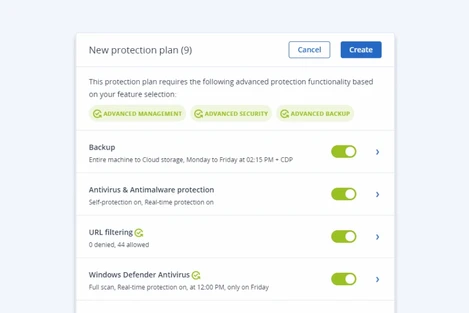
Acronis offers a beyond backup with flip-of-a-switch disaster recovery solution, integrated with all the backup functionalities you need. Along with a proper design of a Business Continuity and Disaster Recovery plan that you can prepare in-house, or with the help of a Service Provider like NetShop ISP, you can ensure that your business is setup in a way that whatever disaster occurs, your online business and data will not be at risk.
Features of Acronis Cyber Disaster Recovery
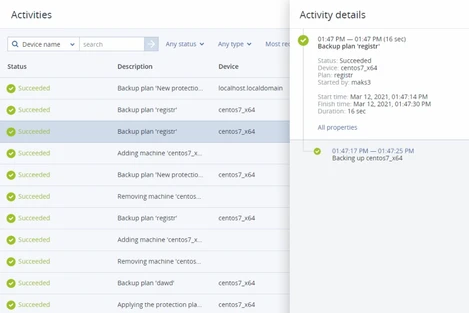
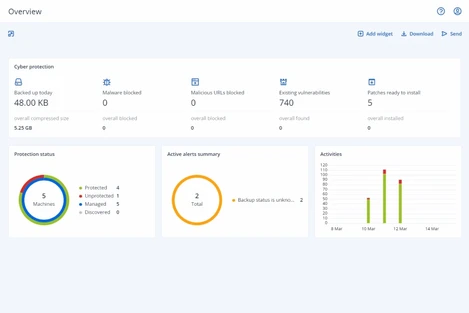
Acronis Cyber Cloud Protect Dashboard
1. Easy, scalable management of your organization
Whether you are managing a single business entity, or a complex organization with multiple subsidiaries and departments, Acronis intuitive Web interface helps IT managers to manage 1 or more organizations and users with role-based access levels.
2. Disaster recovery orchestration with runbooks
Automate critical disaster recovery scenarios and ensure your systems recover in the correct order to address inter-dependencies between applications.
3. Under 15-minute RPOs and RTOs
Achieve both RPOs and RTOs shorter than 15 minutes. Acronis enables best-in-class production and test failover speed, while flexible backup frequency policies lead to tighter RPOs.
4. Automated testing of all key disaster recovery scenarios
Verify the integrity of your disaster recovery plans by executing runbooks in test-mode and isolating testing from the production network.
5. Disaster recovery for virtual and physical workloads
Support all popular workloads, including Windows and Linux physical servers and VMs, major hypervisors, and Microsoft business applications.
Awarded, Industry-leading Software
Acronis Industry’s Recognitions & Awards
Acronis Cyber Security Solutions in Cyprus, Malta and the United Kingdom
NetShop ISP is an Authorized Service Provider of Acronis, providing cloud backup, cyber protection and disaster recovery solutions to private organizations and Governmental institutions in Cyprus, Malta and the United Kingdom.
With a team of more than 10 dedicated Acronis Certified professionals within the Company, NetShop ISP can help you for IT audits, disaster recovery plans and implementation of the best strategy that fits your business model and budget in order to ensure your data is secure and your infrastructure maintains the highest uptime.
How to Create an Email Account in cPanel in 3 Easy Steps
In this article you will learn how to create an e-mail account in cPanel and how to manage it via a Webmail client in 3 easy steps.
cPanel is the most popular and easiest to use control panel for hosting your website, installing and managing SSL certificates, accessing your website’s files and creating Databases.
Additionally, through cPanel’s graphical interface you can easily manage your e-mail accounts which you can then quickly access via Web-based email clients such as Roundcube and Horde, or configure in Microsoft Outlook, your mobile device etc.
In this article we will show you how to create an email account in cPanel in 3 simple steps, and how to access your e-mails via the Webmail clients that cPanel offers.
1. Login to cPanel and navigate to the E-mails Section
Depending on how your hosting provider gives you access to your cPanel account, you can login to cPanel by typing either an IP address or a domain name in your browser, followed by 2083 port:
Navigate to the E-mails section and click E-mail Accounts as shown below.
Create Email Account in cPanel: Step 1
2. Create your new E-mail Account
Click the Create button that appears on the left side of the screen in order to proceed with your new e-mail account creation.
Create E-mail Account in cPanel: Step 2
Now you need to enter your desired username for the newly created e-mail acccount, then set your password and click the Create button as shown below.
How to Create an E-mail Account in cPanel: Enter your Detials
Your E-mail account has been successfully created! Easy, right?
Now follow this final step to access your new e-mail account via Roundcube or Horde Webmail clients.
3. Access your E-mail with a Webmail Client
Upon the creation of your new e-mail account, you will see a list of all the email address your cPanel account has. Click on the Check Email button as shown below.
How to Create E-mail Account in cPanel: Step 3
Once you click “Check Email” for the first time, you will be prompted to a page where you can configure your favorite Webmail client. In this example we will choose Roundcube.
Roundcube Webmail Client for cPanel Email Accounts
Click the Open button and you will be redirected to the Inbox of your newly created e-mail, as shown below.
View your E-mails with Roundcube Web-based Email Client
Success! You can now start sending and viewing received e-mails from Roundcube Webmail client!
If your provider’s cpanel hosting is configured to use IMAP, then you can also configure your e-mail account in iMail, Thunderbird, Microsoft Outlook and your mobile device. With IMAP protocol, e-mails sent & received will appear in all devices and e-mail clients.
How to Buy Cheap E-mail Hosting
All our cPanel web hosting plans come with the E-mail hosting service. Whether you want to combine website hosting and e-mail accounts, or just looking for a cheap e-mail hosting service, NetShop ISP can offer that with plans starting from €5 per month.
In addition to the Free cPanel control panel provided with all web hosting accounts, we offer 24×7 Free technical support for all of your website and e-mail administration needs.
Where to host a gambling website?
Things you need to consider when choosing where to host your gambling website, and some of the most popular iGaming hosting locations too.
‘Where is the best place to host a gambling website?’ is one of the most common questions amongst those starting out with their new online gambling business – and rightly so. Where you choose to host your gambling website will directly impact its potential performance and success. With iGaming still being a relatively new industry, rules and regulations change per jurisdiction, so finding the right hosting location is essential.
In this article we’ll look at what things you need to consider when choosing where to host your gambling website, and some of the most popular iGaming hosting locations too.
Choosing a gambling website hosting location
Here are the top three things to consider when choosing a hosting location for your gambling website.
Gambling-friendly jurisdiction
As we mentioned, online gambling isn’t legal everywhere so the first thing you need to make sure of is that you choose a hosting location where online gambling is permitted. You would preferably want to host your website somewhere where it’s relatively easy to obtain a gambling license too. Bear in mind that every jurisdiction has different requirements when it comes to getting a license, so make sure you do a little research and attain all the necessary documents.
Tax System
Choosing to host your gambling website somewhere with a comprehensive taxation system is also ideal. In a nutshell, it’s beneficial to opt to host your gambling website somewhere with a low tax rate, so make sure to assess a country’s taxation policy first.
Infrastructure
Finally, guaranteeing your players a smooth experience is the key to the success of your online gambling business, so you need to host your website somewhere with strong infrastructure and network connectivity in place for optimal performance.
Best places to host a gambling website
Malta
Malta is amongst the ultimate locations to host your gambling website for a multitude of reasons. The small European country leads the gambling industry with innovation and has done for the last 20 years. Malta has become a hub for online gaming businesses, with many big industry names’ headquarters located there. Malta’s access to European trade treaties and rather complex taxation system that means corporate tax can be as little as just 5%, makes it an extremely popular location to host iGaming websites.
Curacao
Another hugely popular place to host a gambling website is Curacao, the Caribbean country that’s part of the Netherlands. Obtaining a Curacao gambling license is really quite easy and cost effective, making it one of the most frequent jurisdictions to host a gambling website. The Netherlands is also set to make some big changes in their gambling legislation, which will most likely see them soar in the iGaming industry.
United Kingdom
The UK is actually one of the biggest online gambling operators, and is extremely well established within the iGaming sector. Although the process of obtaining a UK gambling license is trickier and legislation is a lot stricter, getting a gambling license and hosting your gambling website in the UK will help you build a strong, trustworthy reputation in the industry.
iGaming Solutions with NetShop ISP
With over 10 years’ experience and multiple awards in the iGaming industry, we’re proud to offer a range of comprehensive and affordable solutions for betting, lotteries, casino-style games and much more.
We host premium industry customers in the United Kingdom, Cyprus and Malta at data centres that comply with all local iGaming regulations.
For more information on our iGaming services, please don’t hesitate to get in touch.
Launching new Webinar Series for the Forex industry
The first Forex webinar will address a hot topic that interests both Forex brokers and traders: How Trading with low-latency can help Traders, and how that can be achieved. 6th of May 2021 at 15:00 CET (Registration is Free)
NetShop ISP, a globally established Cloud & Infrastructure provider, announces the launch of a brand new Webinar Series with interesting topics for the Forex industry professionals; brokers, traders & suppliers.
“Along with the successful launch of the “InsightS iGaming Webinar Series” intended for the iGaming and Gambling sector, the new Forex Webinar Series will cover technology topics in a non-technical way. Our goal is to educate the Forex industry professionals about new technology tools and services and their adoption within the Forex ecosystem.”
said Katerina Burtsava, Head of Sales at NetShop ISP
First Webinar: Understand the Benefits of Low Latency Trading in Forex Trading
The first webinar will address a hot topic that interests both Forex brokers and traders: How Trading with low-latency can help Traders, and how that can be achieved.
Registration is Free and the number of participants is limited, so grab your seat today from the event’s registration page: https://events.netshop-isp.com.cy