NetShop ISP Accepts Crypto Coins for Web Hosting and Servers via Coinbase

NetShop Internet Services Ltd (NetShop ISP), a global web hosting & servers provider established in Cyprus, is announcing, today, the availability of Coinbase Commerce as an official Payment method for all web hosting, Domain Registrations, Cloud & VPS, Dedicated servers and Colocation hosting services.

NetShop Internet Services Ltd (NetShop ISP), a global web hosting & servers provider established in Cyprus, is announcing, today, the availability of Coinbase Commerce as an official Payment method for all web hosting, Domain Registrations, Cloud & VPS, Dedicated servers and Colocation hosting services.

Coinbase is one of the largest Cryptocurrency exchanges that supports trading, sending and receiving of multiple crypto coins such as Bitcoin (BTC), Ethereum (ETH), Bitcoin Cash (BCH), Litecoin (LTC), and more.

NetShop ISP was the first web hosting provider in Cyprus and Malta to accept Bitcoin payments for all of its web hosting products & services in 2017.

Until now, our Customers were able to pay for Web hosting and Servers with Bitcoin via BitPay. As per the recent KYC requirements that BitPay enforced, a large proportion of our Customers were facing difficulties in using this payment processor. Today, we are happy to announce that we have integrated with Coinbase so that anyone can pay with the Cryptocurrency of their choice fast and anonymously“, said Lorenzo Sordini, CFO at NetShop ISP.

Benefits of Coinbase as Cryptocurrency Payment Service

  • Buying and selling bitcoin (exchanging it to your local currency)
  • Sending and requesting bitcoin by email or bitcoin address
  • Secure, Anonymous, Fast and Free Payments

Pay For Web Hosting & Servers with Crypto

NetShop ISP accepts payments in Crypto for the following products & services:

Customers of NetShop ISP can choose Coinbase Commerce during their Order Checkout and Renewal invoices and proceed with instant payment. Alternatively, you can request from Billing department an address so you can send the payment in crypto manually.

How To Install Softaculous Auto-Installer in cPanel Server

Softaculous can be installed in the most popular web hosting control panels like cPanel, DirectAdmin, Interworx, Plesk and ispManager. In this article we will provide a step-by-step tutorial on how to install Softaculous in a cPanel VPS or Dedicated Server.

What is Softaculous

Softaculous is one of the most popular and favorite auto installers in the Web hosting industry. It includes a list of more than 400 scripts and 1115 PHP Classes which is continuously updated and extended.

Softaculous has become over the years the leading Scripts installer as it includes almost every script and CMS that anyone will need. Some of the most popular scripts included are WordPress, Joomla, SMF, Drupal, Dolphin, PrestaShop and a thousand more.

Whilst Softaculous can be installed in the most popular web hosting control panels like cPanel, DirectAdmin, Interworx, Plesk and ispManager, in this article we will provide a step-by-step tutorial on how to install Softaculous in cPanel.

Installing Softaculous in cPanel

Requirements

  • A VPS or Dedicated server with cPanel installed
  • Enable ionCube loaders in cPanel (steps included below)
  • If you have a firewall, you need to allow the following domains and IP addresses as these are the official Softaculous mirrors used to download the script packages for installation:

192.198.80.3 # api.softaculous.com
158.69.6.246 # s1.softaculous.com
192.200.108.99 # s2.softaculous.com
213.239.208.58 # s3.softaculous.com
138.201.24.83 # s4.softaculous.com
167.114.200.240 # s7.softaculous.com

Step-by-step Installation Commands

1. Enable ionCube loaders in cPanel / WHM

  • Login to WHM as root
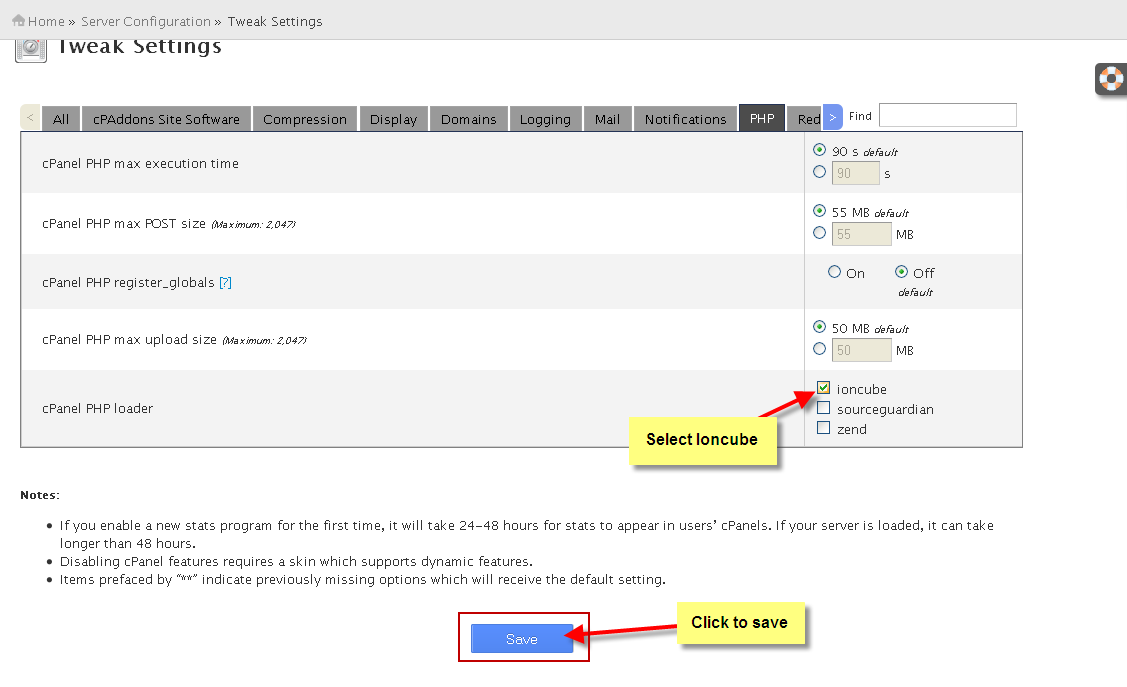
  • Go to Server Configuration -> Tweak Settings -> search PHP from the top-right search filter
  • Select ioncube check box for cPanel PHP loader.
  • Click on Save button.
  • ionCube loaders are now enabled on your cPanel Server
How to enable ioncube loaders in cPanel/WHM

2. Install Softaculous from Shell / CLI

Connect on your server via SSH with a root-privileges account and type the following commands, one-by-one:

wget -N http://files.softaculous.com/install.sh
chmod 755 install.sh
./install.sh

Now go to: WHM > Plugins (or Add-Ons if u are using WHM with version older 11) > Softaculous – Instant Installs

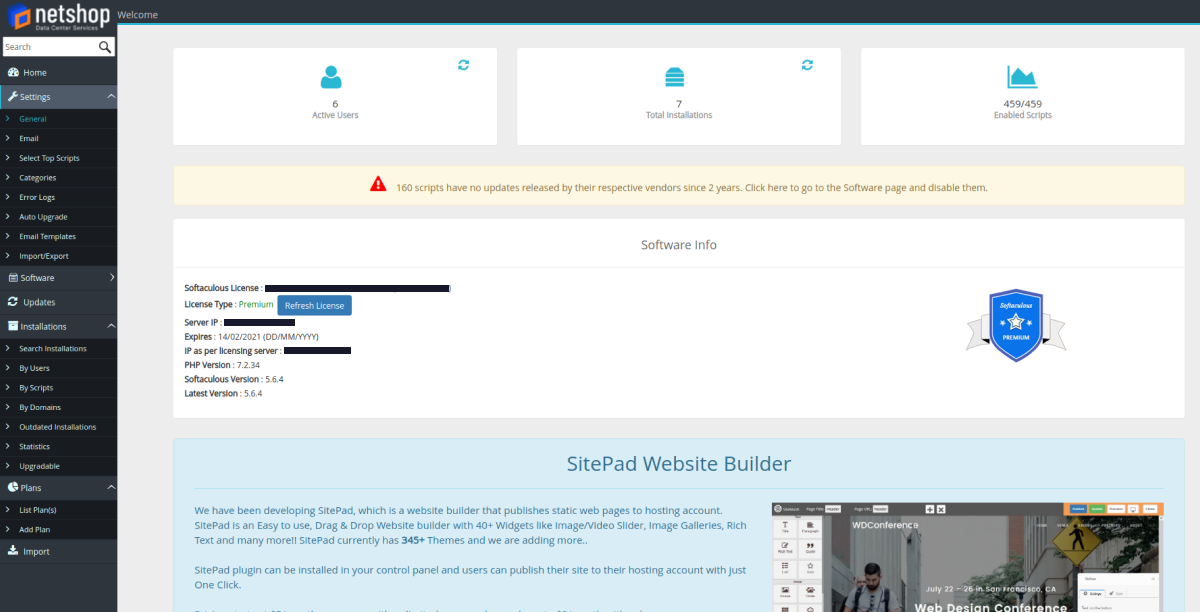
Softaculous screenshot after successful installation

Your Softaculous in cPanel Control Panel has been successfully installed!

You are automatically switched to the Free/Trial license. Contact NetShop ISP Sales team to obtain a cheap Softaculous Premium license.

How to Fix WordPress Fatal error: Allowed memory size exhausted

In this article we will cover one of the most common WordPress errors: “Fatal error: Allowed memory size exhausted”. By the end of reading this article you will be able to understand what is causing this error and how you can fix it.

In this article we will cover one of the most common WordPress errors: “Fatal error: Allowed memory size exhausted”. By the end of reading this article you will be able to understand what is causing this error and how you can fix it.

What is WordPress Memory Exhausted Error?

WordPress is a Content Management System written in PHP, which is a server-side programming language. Every website that is published on the Internet needs an appropriate WordPress Web Hosting account or server so that it functions properly.

Web hosting servers , like any other computer, they need memory in order to run multiple applications at the same time. By default, WordPress automatically attempts to increase PHP memory limit if that is less than 64MB. However, 64MB is often not high enough.

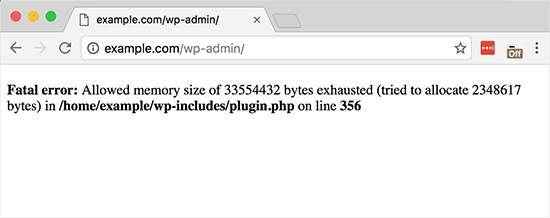
When your WordPress website is using plugins or themes that require more memory than the default allocated, the following error appears:

Fatal error: Allowed memory size of 33554432 bytes exhausted (tried to allocate 2348617 bytes) in /home/username/public_html/wp-includes/plugin.php on line xxx
Memory Exhausted Error in WordPress

How to Increase PHP Memory Limit in WordPress

The first step to increase PHP Memory limit in your WordPress website is to edit the wp-config.php file on your WordPress site. You can locate the file under your WordPress site’s root directory.

If you are not experienced or comfortable with using a shell editor like ‘nano’ or ‘vi’ then you will need to use an FTP client or File manager in your cPanel or Plesk control panel.

Open the wp-config.phpfile and paste the following code just before the line that says ‘That’s all, stop editing! Happy blogging.

define( 'WP_MEMORY_LIMIT', '256M' );

Save your changes and upload the updated wp-config.php file back to the same directory on your web hosting account / server.

Your WordPress website should now be working properly and the Memory Exhausted error should be gone.

I followed all the steps but i am still getting the same Memory Exhausted Error

The above solution has been tested with VPS and Dedicated Servers, as well as with NetShop ISP’s WordPress optimized web hosting accounts. The server environment from one web hosting provider to another differs, so if this solution does not work for you, you will need to contact your web hosting company to increase the PHP memory limit manually.

If you are a NetShop ISP Customer experiencing a Memory issue on your WordPress Website please contact our WordPress Hosting experts for help and to get the issue resolved.

Crypto exchange Coinbase decides to hit the public markets on NASDAQ

Crypto exchange Coinbase has surprised the world of crypto, opting for a direct listing on Nasdaq instead of the rumored IPO.

Crypto exchange Coinbase has surprised the world of crypto, opting for a direct listing on Nasdaq instead of the rumored IPO.

Exchange operator Coinbase has chosen Nasdaq as the venue for its direct listing, according to two sources familiar with the San Francisco crypto unicorn’s plans.

The firm’s plan to tap the public markets in the coming weeks follows a secondary offering on Nasdaq Private Market. 

On January 25, Nasdaq Private Market launched a secondary market for Coinbase stock, a move that allowed shareholders with vested equity to sell shares. Nasdaq Private Market offers services for companies ahead of an IPO, including “controlled liquidity programs for pre-IPO companies looking to raise secondary capital for shareholders and investors.”

According to one source, shares on Nasdaq Private Market were matched at a price of $200. With 254 million shares outstanding, that’s an implied valuation of approximately $50 billion for the firm. 

That calculation also represents a major discount from where pre-IPO futures contracts are trading for Coinbase on FTX. Shares are trading at $277, implying a valuation just below $70 billion. 

Source: https://www.theblockcrypto.com/linked/93294/coinbase-nasdaq-direct-listing

Best and Affordable cPanel Web Hosting in 2021

cPanel is one of the most popular Linux-based control panels that allows users to simply and conveniently manage their website and server from a single management place.

When it comes to control panels, cPanel is certainly one of the most popular for server and website management. The online Linux-based control panel allows users to simply and conveniently manage all services in a single place. Let’s take a look at how to choose the best and most affordable cPanel web hosting in 2021.

What is cPanel?

cPanel is an industry leading, user-friendly control panel used to simplify website and server management. It is a web-based graphical interface that allows users to manage a range of elements.

Put simply, cPanel provides users with an intuitive dashboard that makes it easy and efficient for them to manage and run their websites, without having advanced technical knowledge. The user-interface ultimately makes completing certain tasks more simple and understandable for both developers and the average user.

Benefits of cPanel

As one of the most popular and well-known control panels, the benefits of using cPanel are plenty. Some of the main benefits of using cPanel are:

1. Simple interface

Easy to learn and use, cPanel makes all the difference in the smooth and effective running of websites. The graphic interface has been designed to simplify complex tasks and as such, is extremely user-friendly and highly responsive.

There are many things that you can do with cPanel like manage domains, create email accounts, FTP, regular backups, install WordPress or any other CMS, and much, much more.

2. Software installation

As we just mentioned, the installation of WordPress, Joomla or any other software is made extremely easy with cPanel. In general, processes like uploading and installing features are incredibly straightforward.

3. Compatibility

Another important benefit is that cPanel is compatible with all web browsers. Not only does it work well with all browsers like Chrome, Safari and so on, but also with a wide variety of plugins and extensions.

4. Flexibility

It’s just easier to manage a website through cPanel as it provides a high level of control and flexibility. Regardless of the complexity of a website, cPanel provides a VPS or dedicated server with great features that heavily assist in managing sites.

Now that we’ve covered the benefits of cPanel, let’s take a closer look at how to choose the best cPanel web hosting provider.

How to choose the best cPanel web hosting provider in 2021

Price

Of course, when deciding on your hosting provider, affordability is a determining factor. Cost is important, especially if you are on a budget. So opting for providers who offer free extras is ideal in order to get extra value for your money.

At NetShop ISP, we include free LetsEncrypt, domain name and more with all of our cPanel Web Hosting Plans.

24/7 Support

When choosing your cPanel web hosting provider, round-the-clock support is essential. It is crucial to choose a provider who offers a responsive and reliable 24/7 support team that you can contact via phone, email and even live chat – giving you the peace of mind that any issues can be resolved no matter what time.

The NetShop ISP Hosting Experts are on hand 24/7 for client support.

Automation Scripts

Something else to consider when choosing your hosting provider is automation scripts, in order to ensure that the cPanel functionality meets your specific business requirements.

With our cPanel hosting plans, you can choose from a huge variety of Scripts, and install them completely hassle-free, with a single click!

If you’re interested in finding out more about the benefits and functionalities of cPanel, visit our website here.

NetShop ISP

Our Web Hosting Plans come with the powerful and intuitive cPanel™ Control Panel and 24/7 expert support.

For additional consulting or help with any questions you may have, you can contact our Hosting Experts.

Celebrating the Data Privacy and Protection Day with Cyber Security Tips

Data protection is the process of securing important information from compromise, loss or corruption, and ensuring that data can be restored quickly under all circumstances.

This year, 2021, 28th of January is the 40th Anniversary of Convention 108 and also the 15th edition of Data Protection Day.

The global pandemic (COVID19) resulted in many of us becoming dependent on our mobile devices more than even before. Technology is advancing rapidly and both people in our personal lives and businesses are rushing to cope with the new trends in order to do things differently, more remotely.

Data protection is the process of securing important information from compromise, loss or corruption, and ensuring that data can be restored quickly under all circumstances.

What Data needs to be protected at all costs?

There are certain pieces of data which are commonly stored by businesses when users and customers conduct online transactions. The key information that almost any online company you have ever done business with, include:

  • Name and Surname
  • Physical Address
  • E-mail address
  • Telephone and Mobile number
  • Bank and Credit Card details

How do you protect data?

1. Encrypt your Data

To protect your online transactions, ensure that the websites or web applications you are using have the “lock” icon on the status bar of your internet browser. This means that the website you are using is protected by an SSL Certificate which helps the secure transmission of the information between your smartphone or laptop and the server.

Another way to encrypt your data is by using a secure VPN which helps to hide your anonymity when browsing online and keeps prying eyes away.

Read related article: “Revealing the secrets of VPN: Why and When to use a VPN

2. Keep Passwords Private

Since you cannot control whether an online store/website you are frequently doing transactions with is going to be hacked, all you can do is ensuring that the passwords you are using are unique with each account you have and randomly generated.

If the database of a business gets hacked your account details, including your password, will be revealed to the hackers. It’s a bad practice to be using the same email address and password for all of your online accounts (social platforms, e-commerce websites).

3. Spare the information you share in Social Media

The more information you post in Social Media (instagram, facebook, linkedin) the more you expose yourself to identity thieves. It is important, when setting up your account in any social network, to setup additional security like hard-to-guess Security Answers & Questions, and when possible, use Two-factor Authentication (2FA) for logging in.

Read related article: “Why Two-factor Authentication (2FA) is Important in Cyber Protection for Businesses”

4. Keep your Devices Secure

In addition to the use of a VPN when browsing the Internet, as we mentioned earlier, there are a few more tips on how to ensure your mobile devices and laptops are secure from hackers. Ofcourse, there is no recipe that will keep anyone 100% secure, however the following best practices will significantly reduce your exposure to hackers and cyber attacks.

– Use Security Software

Install anti-virus software, anti-spyware software, and a Firewall. It is of great importance, especially for Windows users, to protect against intrusions and infections that can compromise your mobile or computer fields. Finally, installing security patches and keeping your Device Operating system up-to-date is essential.

– Beware of Phishing Emails

Never open attachments or click on links in emails sent by strangers. Distributing malware and spyware via phishing emails is one of the most frequently used methods for hackers to penetrate your device.

– Read Privacy Policies

During the past few years there has been a lot of buzz about Privacy Policies and a lot of cases when governments forced the Internet Giants (Facebook, Amazon, Google, Microsoft) to refine their Privacy Policies as a way to protect Consumers data.

Privacy policies can be long and complex, but they will tell you how the particular business/website stores, maintains, controls and processes your personal information. If there is no privacy policy publicly available in the website/business you are about to sign up, or if you cannot understand it clearly, consider doing business elsewhere.

How To Protect Your Data with NetShop ISP and Acronis Cyber Protect

NetShop ISP, an Acronis Authorized Partner, is helping thousands of users and hundreds of businesses in regards to their Data Security, Backup and integrity of the information after Recovering from a loss.

With Acronis Cyber Protect, NetShop ISP offers a very affordable solution to backup any Device (Laptop, Smartphone, PC, Server) along with real-time anti-virus and malware scan for Windows, Linux, Mac and your E-mails.

To celebrate this Year’s Data Privacy and Protection day, we are offering free consultation for our Cyber Security and Data Protection solutions.

Contact us and one of our Solution experts will contact you to arrange a meeting & free demo.

How to Choose an Online Casino Software Provider In 2021

With the iGaming market growing at such a speed, it’s important to choose a trusted online casino software provider that will ultimately help your online casino business grow quickly.

Choosing the right online casino software provider is one of the most important decisions that you will make when setting up your business. Your choice of casino software provider will directly affect the success and popularity of your online casino and determine whether yours will become one of the best online gambling sites.

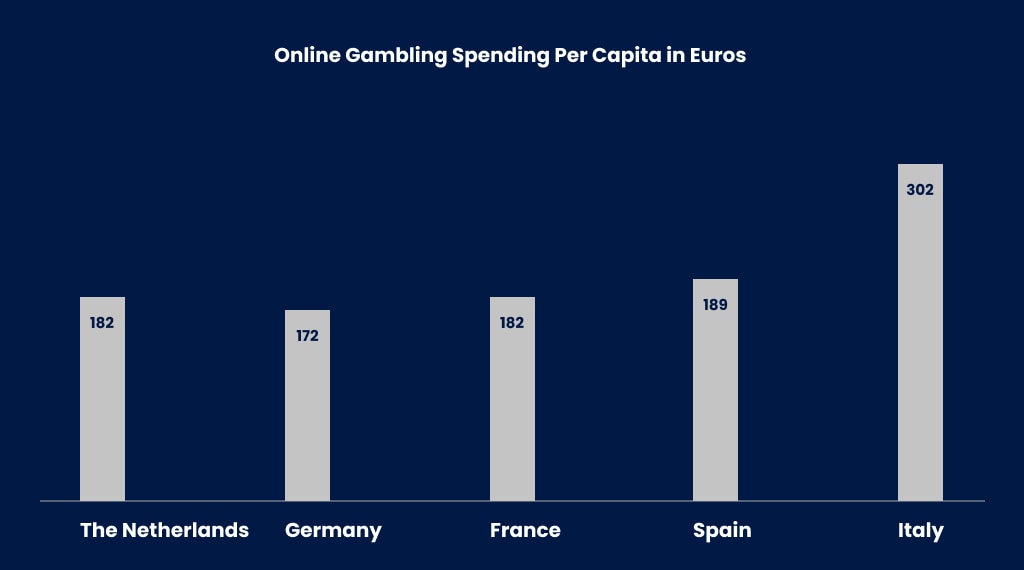
The popularity of online casinos and gambling is growing rapidly and is only set to further increase over the coming years. The developments in technology and online security have made online gambling one of the fastest growing industries, with Europe becoming the biggest gambling hub in the world. Following the lead of Curacao, one of the oldest iGaming jurisdictions in the world, Malta has quickly become the ultimate destination for iGaming businesses with many successful industry players choosing the country as a location for their headquarters.

Read a related Blog Article for Online Casino: https://netshop-isp.com.cy/blog/online-casino-trends-in-2021-and-the-growth-of-online-gambling-during-covid19-era

With the iGaming market growing at such a speed, it’s important to choose a trusted casino software provider that will ultimately help your online casino business grow quickly.

With that in mind, let’s take a look at how to choose an online casino software provider in 2021.

1.   Choose licensed software

It’s crucial that you are certain that the software you’re going to have on your site is licensed. Although you may think to choose a cheap online casino software provider, this may result in software that could potentially contain viruses or software that does not work properly. Choosing licensed software will ensure you and your users that you are a trustworthy online casino and ultimately help build your reputation.

2.   Choose popular games

Online gambling is a fast moving industry, and in 2021 online casinos are expected to further expand – so it’s important to keep up with trends. That’s why you should make sure to choose a casino software provider with popular and exciting games that keep players engaged. Having a variety of diverse games, like slots and table games, to suit each player’s preferences is important when trying to build a wide audience.

3.   Choose excellent graphics

Although having a large number of games is important, the quality of the games is even more so. First impressions count and graphics are an important measure of a game’s worth, that’s why it’s vital to choose a software provider that consistently offers crisp and clear graphics. Poor graphics will make your site look cheap and untrustworthy, and will have a direct effect on building a loyal customer base.

4.   Choose a trusted online casino software provider

The reputation of a casino software provider is of the utmost importance and you should choose a provider who offers high quality, innovative and secure software. Using a well-established and reputable casino software provider is also another way to build a strong audience-base and attract more players to your online casino.  

Choose NetShop ISP for your iGaming Services

NetShop ISP has been involved in the iGaming sector for over 10 years with premium industry customers in Cyprus, Malta, Netherlands, United Kingdom, United States and Singapore.

NetShop ISP is a three-time award winning iGaming Solutions Provider, having won the Award of “Best Services Provider of the Year” (SBC Awards) in 2020 and the “Best iGaming Service Provider” twice (CEEG Awards, Budapest and SEG Awards, Milan) in 2019. Moreover, NetShop ISP was a Ranked Finalist in the “Best Hosting Services” Award category at the Malta Gaming Awards in 2019.

With our Data Centers strategically situated in prime locations, our iGaming server hosting solutions guarantee your audience has a seamless iGaming experience. At NetShop ISP, we are online gaming hosting experts, and offer a range of solutions for Casino-type games, Betting, Betting exchanges, Gaming platforms, Online casino, Casino-style games and Lotteries.

Dr Carl Brincat Appointed as the new CEO of Malta Gaming Authority (MGA)

The Board of Governors of the Malta Gaming Authority (MGA) has appointed Dr Carl Brincat as Chief Executive Officer of the MGA with immediate effect.

The Board of Governors of the Malta Gaming Authority has appointed Dr Carl Brincat as Chief Executive Officer of the MGA with immediate effect, in terms of article 6(2)(a) of the Gaming Act (Cap. 583 of the Laws of Malta).  The appointment follows a highly competitive selection process which was commenced with the launch of a public call for applications on 17 December 2020.

Carl is a lawyer by profession and previously held the role of Chief Legal & Enforcement Officer within the MGA.  Following three years of training in the field of criminal law, he joined the MGA’s legal team and has been a part of it for over six years, forming part of the strategic direction of the Authority and its high-level regulatory Committees for the past four.  Carl sits on the Board of the Financial Intelligence Analysis Unit, and is a member of the Chamber of Advocates (Malta), the International Masters of Gaming law (IMGL), and the International Association of Gambling Regulators (IAGR), and has also been a regular speaker in local and international conferences relating to gaming and international regulatory issues.

Carl Brincat said: “It is an honour to be selected to lead the organisation at such a critical juncture for the MGA and the industry alike.  I am proud of the work that has been done by the Authority so far in raising regulatory standards and committed to ensuring that we continue along this path.  However, it is essential that we cultivate stronger partnerships with other regulators and stakeholders, and the industry itself, to achieve a regulatory environment that accomplishes the MGA’s objectives as set out in the law in the most effective, transparent, and proportionate manner.”

Source: https://www.mga.org.mt/malta-gaming-authority-appoints-new-chief-executive-officer-2/

NetShop ISP Announces the Availability of IT-as-a-Service (ITaaS) Solution

NetShop ISP, the Awarded Data Center & Cloud Services Provider, today announced a new IT solution that allows small companies and large enterprises shift to the next wave in IT – the IT as a Service (ITaaS) model.

NetShop ISP, the Awarded Data Center & Cloud Services Provider, today announced a new IT solution that allows small companies and large enterprises shift to the next wave in IT – the IT as a Service (ITaaS) model.

What is IT-as-a-Service?

Whilst the IT infrastructure forms the backbone of an organization, the expensive upfront IT costs and the complex on-going maintenance processes of the traditional IT solutions are the two major obstacles and headaches for most organizations.

As the technology evolves, there is an increasing demand by all Companies for the latest technological features & software, lower costs, enhanced security protocols, and dedicated IT support.

The IT-as-a-Service model provides immediate and direct access to IT solutions based on a subscription model which offers Customers the convenience of having to only pay for what they actually need with a minimum or even zero presence of in-house IT staff.

“I am grateful that NetShop ISP was able to act in a timely manner to address the emerging needs of the small and medium-sized businesses in Cyprus, due to the COVID-19 pandemic. The IT-as-a-Service solution has been introduced to our customers since March 2020; today, we are happy to announce its availability to the public in order to help remote teams and businesses for their fast, secure and efficient transition into home working.” said Stefano Sordini, CEO at NetShop ISP.

Benefits of ITaaS for your Business

NetShop ISP’s IT-as-a-Service solution delivers a turnkey solution with 24/7 Technical Support and Maintenance, Software licensing, Cyber security management – for a predictable monthly-based subscription charge and without any IT Hardware purchasing expenses.

Businesses of any size can benefit from the following features of our ITaaS model:

1. 24/7 IT Support

With ITaaS, you outsource all IT support and maintenance functions, and know that whatever time of day, your IT services are supported by a specialist team with a round-the-clock coverage.

2. Pro-Active Monitoring

Pro-active monitoring aims to identify the symptoms or indications of a fault or issue before it develops into something that could cause a business impact. With IT-as-a-Service all of your core business IT components (VPN, Network, Software, Hardware) are under continuous monitoring by our 24/7 team to detect any alerts or abnormal behaviour.

3. Performance and SLA Monitoring

A real benefit of the ITaaS model is that each business pays only for what it needs. Large enterprises with a business-critical IT infrastructure may require 30 minutes response time whereas a law firm can operate sufficiently even with a 4 hours SLA. We evaluate your business scope and we will offer the best Performance and SLA contract that matches your real needs and budget.

4. Cyber Security Protection

Protection against malware and cybersecurity are an integral part of our ITaaS solution. This means that in addition to supporting your IT infrastructure, our team will also protect your systems, network and end-users (staff) from security threats. Your ITaaS infrastructure is protected by managed firewalls, endpoint protection, and web filtering.

5. ITaaS Subscription-based Model

The concept of a subscription is what sets IT-as-a-Service model apart from its counterparts. Your business pays monthly only for what you choose to cover from the following scope of IT services:

  • Core IT infrastructure: Servers, Network, Firewalls, Databases
  • User Support & Licensing: Technical Support, SLA contract, Web filtering, Software & Anti-virus licenses

Scalability and Flexibility of Service Delivery

As all of the services and software are provisioned from a secure Private Cloud, deployment of new software, users, licenses and maintenance and upgrades of the infrastructure is done seamlessly without the need of purchasing additional hardware or disturbing your business during working hours.

The ITaaS solution offered by NetShop ISP is provisioned from within our Global Data Centers in the countries where we operate; Cyprus, Malta, United Kingdom, Netherlands, United States and Singapore. Depending on your business’ structure and the locations of your offices we will deploy your Infrastructure & services in a Private Cloud environment at the nearest location where your business operates from.

Why Two-factor Authentication (2FA) is Important in Cyber Protection for Businesses

Two-factor Authentication (2FA) adds another essential layer of protection here, which ensures that Acronis Active Protection can work properly and minimizes the chance of an entire organization hack thanks to the 2FA authenticator app on users’ mobile devices.

As per a recent research by Cyber Security Ventures, by this year, 2021, businesses will be hit by ransomware every 11 seconds.

Phishing and spear-phishing continue to be the number one infection vector and administrators are quite often the target. Of course, in many large organizations the administrators that control resources and access to data are well aware of these threats and can avoid this trap. In many small- to medium-businesses it’s much more of an issue for admins. And, when admins seem difficult to compromise, cybercriminals can still attack users with higher privileges and then escalate to the admin level where they can do serious, lasting harm.

In ransomware incidents and other kinds of extortion attacks (currently one of the most serious threats for businesses) cybercriminals encrypt business critical data and delete the backups that would serve as a method
of recovery. They then demand a ransom to decrypt data with the threat that, if the ransom is left unpaid, all the encrypted data, applications, and systems will be deleted. They can do many other malicious things once
embedded in an organization’s network, but this is one of the most common attack scenarios and it’s on the rise – ransomware incidents more than doubled in 2019.

Ransomware attacks like these typically start with stolen admin access credentials: login and password. We’re assuming here that the company in question follows a good password strategy – passwords are strong and can’t
be brute-forced unnoticeably. In any case, after getting the required credentials, a cybercriminal can access various resources and execute operations to achieve their malicious goal.

What is 2FA (Two-factor Authentication)

Two-factor authentication is a type of multi-factor authentication that provides extra protection from unauthorized access to your account by checking a user’s identity with a combination of two different factors:

• Something that a user knows (PIN or password)
• Something that a user has (token)
• Something that a user is (biometrics)

How a 2FA transaction works


Anyone who uses online banking, any well-known email provider, messengers, and many other web or mobile services should be familiar with this system. 2FA is widely used in security because it quite effectively neutralizes the risks associated with compromised passwords. If a password is hacked, guessed, or phished as we explained above, it’s no longer enough to give a criminal access.

While many second factors can be used, one of the most popular is a Time-based One-Time Password (TOTP). Typically generated by a mobile app, this is a one-time-use password that expires quickly.

Two-factor Authentication (2FA) with Acronis Cyber Cloud

The Acronis Cyber Cloud 9.0 platform supports Time-based One-Time Password (TOTP) authentication. If the TOTP authentication is enabled in the system, users will need to enter their traditional password and the one-time TOTP code to access the system. The TOTP code is generated in the authentication application on a user’s second-factor device based on the current time and the secret code (QR-code or alphanumeric code) provided by the platform.

Settings of Two-factor Authentication with Acronis

While Acronis Active Protection protects users of Acronis Cyber Cloud, Acronis Cyber Backup, and Acronis True Image from ransomware, it’s important to understand that this technology alone isn’t enough to combat all the cyber threats that face business and home environments if security measures like two-factor authentication and access restriction aren’t in place.

2FA adds another essential layer of protection here, which ensures that Acronis Active Protection can work properly and minimizes the chance of an entire organization hack thanks to the 2FA authenticator app on users’ mobile devices.

Get Free Cyber Security Consulting

NetShop ISP’s Cyber Security specialists can help you in ensuring your business’ online infrastructure and network perimeter is secure from cyberthreats and ransomware.

Contact us today to schedule a Free Web Meeting to learn more about the Acronis Cyber Protect solution.

Do I need an SSL Certificate for my website?

Why SSL Certificates are essential for all Websites nowadays in regards to Web Security, User Trust and Search engine ranking.

If you’re wondering whether or not you need an SSL Certificate for your website; the short answer is yes – you do! Having an SSL certificate has become essential – let us explain why. 

What is an SSL certificate? 

SSL stands for Secure Sockets Layer and is a digital certificate that enables encrypted communication between the browser and the server, ensuring that all traffic between the two is secure. 

Without encryption, a website is vulnerable to data breaches. Having an SSL not only authenticates the identity of a website, but also largely decreases the risk of any sensitive information being stolen. Ultimately, an SSL certificate creates a secure environment for website owners and users. 

How do I know if a website has an SSL certificate?

To check if a website has an SSL, just take a look at the URL. If it begins with ‘http’ instead of ‘https’ it means that the website you’re using does not have an SSL certificate and is not secure. The extra ‘s’ on the ‘https’ stands for secure and shows you that the website has an SSL installed. 

Some browsers will also show you a little padlock icon in the address bar to indicate that the website you’re using has an SSL certificate, and will also notify you when one that you are using does not. You can click the padlock icon to view the certificate information. 

Why do I need an SSL certificate?

Are you still questioning if you need an SSL certificate? Now that we’ve covered what an SSL is, let’s take a look at why you need one. 

 1. Security  

If you request any personal information from a user on your website, such as payment information or private details, it’s absolutely vital that you have an SSL certificate. Without one, you are putting your users at risk of having their sensitive information stolen whilst using your website. 

If you own an ecommerce website, you need to have an SSL installed in order to accept payments securely. As we mentioned before, an SSL ensures data integrity by encrypting all of the data shared between your website and the server, saving you and your users from potential hackers. 

If your website is WordPress or any other database driven site, it is also crucial that you have an SSL to protect the administrator login page. 

2. Increases user trust 

From a consumer perspective, if a website is indicating that it is ‘not secure’ there is little chance you would continue to use it, let alone buy anything or divulge sensitive information. Having an SSL certificate shows the user that your website is safe to purchase from, subscribe or login to. 

Without one, you risk losing potential customers to more trusted sites, resulting in decreased user retention and ultimately, a decline in sales. Having an SSL certificate helps build consumer trust, and improves the credibility and reputation of your website and business. 

3. Search engine ranking 

Even if your website isn’t requesting or processing any sensitive information, it’s still important that you install an SSL certificate. Google takes into consideration a huge number of factors when it comes to search engine rankings, and in 2014 they announced that one of those is whether or not it has an SSL certificate. That means that your website is more likely to rank higher on the search engine results page and have more traffic with an installed SSL certificate. 

Web Security made simple with NetShop ISP

Ready to secure your website? For more information on SSL certificates, how to get FREE SSL installation or to view the commercial SSL brands that we offer, visit our website here.  

NetShop ISP has also managed to secure the best prices from brands to offer our clients cheap SSL certificates. 

You can now also get free LetsEncrypt with all of our cPanel Web Hosting Plans.

For additional consulting or help with any questions you may have, you can contact our SSL Specialists.

Habanero acquires Critical Gaming Supply Licence from the Malta Gaming Authority – MGA

Premium slots and table games provider Habanero has secured a hugely important regulatory milestone through the acquisition of its Critical Gaming Supply Licence from the Malta Gaming Authority (MGA).

Premium slots and table games provider Habanero has secured a hugely important regulatory milestone through the acquisition of its Critical Gaming Supply Licence from the Malta Gaming Authority (MGA).

Capping an outstanding three years of growth and development across the continent for the provider, Habanero has already established itself as one of Europe’s standout studios.

Known for its engaging gameplay, flawless graphics and pitch-perfect sounds – the developer’s 100+ titles have already proven to be an established engagement and revenue driver for operators across 14 regulated European markets.

Habanero’s latest licence enables the studio to provide its content to Malta-based operators, with a number of tier-one brands already billed for announcement in the near future.

The supplier’s new certification also allows it to further progress its preliminary partnerships with Malta-based Scandinavian operators, as well as German-facing entities during the jurisdiction’s grace period.

Commenting on the acquisition of its Critical Gaming Supply Licence from the MGA, Arcangelo Lonoce, Head of Business Development Europe at Habanero said:

“Our growth in the last few years across markets such as Italy has established Habanero as one of Europe’s fastest-growing providers, so we’re absolutely thrilled to be entering the next phase in our company’s development with one of the industry’s must-have accreditations.

 “Thanks to the outstanding work of all our global teams, the wonderful world of Habanero is now set to reach more European players than ever before. We can’t wait to see what our new partners and markets will make of our content, and we look forward to announcing more new partnerships soon enough!”

With a standout collection of titles, Habanero continued to cement its tier-one credentials throughout 2020 by teaming up with industry-leading operators such as Bet365, LeoVegas, and Playtech. 

As well as being nominated for multiple SBC and EGR Awards in recognition of its creative approach, Habanero offers its partners a wealth of in-game promotional tools, with a hard-earned reputation for one of the industry’s most customer-centric approaches.

Source: https://www.sigma.com.mt/news/habanero-nets-mga-licence

How to Get Started in Online Gaming Industry with a Strong Technology Partner

NetShop ISP, established in 2004, is a top web hosting, server and infrastructure provider with more than a decade of expertise in the Online Gambling and Betting industry. With Data Centers presence in key iGaming jurisdictions like Cyprus, Malta and UK, NetShop ISP can help you with anything regarding Web Hosting, Dedicated and Cloud servers, Colocation and Hybrid hosting (private-public Cloud).

Additionally, we can help you with your iGaming license application for Malta (MGA), Cyprus (NBA), United Kingdom (UKGC) and Curacao.

Contact our iGaming specialists today to schedule a Web meeting free of charge.