NetShop ISP to Attend iFX EXPO International 2024 and Announce Global Infrastructure Expansion
NetShop ISP to Attend iFX EXPO International 2024 and Announce Global Infrastructure Expansion.
NetShop ISP, a leading server hosting provider, is excited to announce its participation in the upcoming iFX EXPO International 2024. The event, scheduled to take place from June 18-20 at the City of Dreams Mediterranean Integrated Resort in Limassol, Cyprus, is one of the most prestigious gatherings in the financial services sector, bringing together industry professionals from around the globe.
NetShop ISP’s presence at the iFX EXPO International 2024 will highlight its commitment to delivering top-tier hosting solutions tailored to the needs of the forex and fintech sectors. A key highlight of NetShop ISP’s participation will be the announcement of its significant global infrastructure expansion.
Book a Meeting with NetShop ISP @ iFX EXPO International 2024
In a strategic move to enhance its service offerings and meet growing demand, NetShop ISP is expanding its infrastructure within the Equinix data centers located in London and Singapore. This expansion aims to provide customers with even lower latency, improved connectivity, and enhanced reliability, crucial for high-frequency trading and other latency-sensitive applications.
In addition to the infrastructure expansion, NetShop ISP will showcase its diverse portfolio of services, including:
Forex VPS Hosting: An API-enabled service that enables Forex brokers to integrate and offer ultra-low latency VPS servers to traders.
Dedicated Servers: Offering high-performance dedicated servers and customizable configurations to meet specific requires for their trading platform, liquidity bridge and CRM software.
Low-Latency Connectivity Services: Ensuring minimal latency and fast execution speeds, critical for high-frequency trading environments.
TNFX Broker Partners with NetShop ISP to Offer Low-Latency Forex VPS to Traders
TNFX, a leading Forex broker, is proud to announce its partnership with NetShop ISP, a top-rated provider of server hosting and Forex VPS solutions.
TNFX, a leading Forex broker, is proud to announce its partnership with NetShop ISP, a top-rated provider of server hosting and Forex VPS solutions. This collaboration brings forth an innovative offering: low-latency Forex VPS services tailored exclusively for TNFX traders.
In the fast-paced world of forex trading, every second counts. Traders need lightning-fast execution and stable connectivity to capitalize on market opportunities. With an API integration of NetShop ISP’s Forex Broker VPS, TNFX traders can now enjoy enhanced performance and reliability like never before.
What is Forex VPS, and Why is it Important?
Forex VPS is a specialized hosting solution designed for forex traders. It provides traders with a virtual server environment optimized for running trading platforms and applications. The key advantage of Forex VPS lies in its low-latency connectivity, ensuring that trade orders are executed swiftly and accurately.
By hosting their trading platforms on NetShop ISP’s high-performance servers, TNFX traders benefit from:
Low-Latency Execution: Trades are executed with minimal delay, giving TNFX traders a competitive edge in fast-moving markets.
Reliable Connectivity: NetShop ISP’s VPS solutions offer high uptime rates, ensuring uninterrupted access to trading accounts.
Security and Stability: With state-of-the-art security measures and redundant infrastructure, NetShop ISP’s VPS services provide a secure and stable trading environment.
24/7 Support: TNFX traders receive round-the-clock customer support from NetShop ISP, ensuring assistance whenever needed.
“We are excited to partner with NetShop ISP to offer low-latency Forex VPS to our traders. This collaboration underscores our commitment to providing the best possible trading experience for our clients.”
said Toufic M, Head of Business Development at TNFX
Stefano Sordini, CEO at NetShop ISP, adds “We are excited to partner with TNFX to offer our high-performance VPS solutions to their traders. By combining our expertise in hosting with TNFX’s reputation in forex trading, we aim to empower traders with the tools they need to succeed.”
About TNFX:
TNFX is a leading Forex broker, offering a wide range of trading products and services to clients worldwide. With a focus on transparency, reliability, and innovation, TNFX strives to provide traders with the best possible trading experience. Learn more about TNFX VPS Service.
About NetShop ISP:
NetShop ISP is a leading provider of hosting and infrastructure solutions, specializing in VPS, dedicated servers, and cloud hosting services. With a global presence and a commitment to excellence, NetShop ISP empowers businesses with reliable and scalable hosting solutions. Learn more about NetShop ISP’s Forex VPS solution.
How to Install Nginx, MySQL, PHP on Ubuntu 22.04 (LEMP)
In this article we will provide a step-by-step guide to installing LEMP Stack (Linux, Nginx, MariaDB, PHP-FPM) on a Ubuntu 22.04 Server.
The LEMP stack is a popular web development stack consisting of four key components: Linux, Nginx, MySQL and PHP, each of which play a crucial role in web application development and hosting. In this article we will provide a step-by-step guide to installing LEMP on your Ubuntu 22.04 Server.
Prerequisites
Server with Ubuntu 22.04 OS installed
SSH Access with root or sudo-privileged user
Steps to Install LEMP on Ubuntu Server
Step 1. Switch to Root user
First, switch to the root user using the following command. Unless stated otherwise, all subsequent commands must be executed as the root user.
john@localhost:~$ sudo –i
Step 2. Install Nginx
Nginx is a powerful web server software designed to handle a high volume of simultaneous requests. It offers faster loading times and better performance than most of other webservers.
root@localhost:~$ apt update -y
Once updates are installed run the following command:
root@localhost:~$ apt install nginx -y
Step 3. Start Nginx and Enable Autostart
Start nginx using the following command:
root@localhost:~$ systemctl start nginx
Now, lets make Nginx to automatically start on boot.
root@localhost:~$ systemctl enable --now nginx
If everything is okay, Nginx should be running. Check this by executing the following command:
root@localhost:~$ systemctl status nginx
Sample Output:
● nginx.service - A high performance web server and a reverse proxy server
      Loaded: loaded (/lib/systemd/system/nginx.service; enabled; vendor preset: enabled)
     Active: active (running) since Sun 2023-09-10 16:27:18 UTC; 23s ago
       Docs: man:nginx(8)
   Main PID: 2079 (nginx)
      Tasks: 3 (limit: 1588)
     Memory: 5.2M
        CPU: 30ms
     CGroup: /system.slice/nginx.service
             ├─2079 "nginx: master process /usr/sbin/nginx -g daemon on; master_process on;"
             ├─2082 "nginx: worker process" "" "" "" "" "" "" "" "" "" "" "" "" "" "" "" "" "" "" "" "" "" "" "" "" "" "" ""
             └─2083 "nginx: worker process" "" "" "" "" "" "" "" "" "" "" "" "" "" "" "" "" "" "" "" "" "" "" "" "" "" "" ""

Sep 10 16:27:18 ubuntu systemd[1]: Starting A high performance web server and a reverse proxy server...
Sep 10 16:27:18 ubuntu systemd[1]: Started A high performance web server and a reverse proxy server.
Step 5. Install MariaDB Server
MariaDB Server is one of the most popular open source relational databases. It’s made by the original developers of MySQL and guaranteed to stay open source. It is part of most cloud offerings and the default in most Linux distributions.
root@localhost:~$ apt install mariadb-server -y
Step 6. Start MariaDB and Enable Autostart
Similar to the procedure we followed with Nginx, we need to ensure it will automatically start on server boot.
root@localhost:~$ systemctl enable –now mariadb
Now, check the status of MariaDB to ensure it’s running properly:
root@localhost:~$ systemctl status mariadb
The previous command should output something that resembles the following.
Sample Output:
● mariadb.service - MariaDB 10.6.12 database server
  Loaded: loaded (/lib/systemd/system/mariadb.service; enabled; vendor preset: enabled)
  Active: active (running) since Sun 2023-09-10 16:29:46 UTC; 18s ago
  Docs: man:mariadbd(8)
  Main PID: 3405 (mariadbd)
  Status: "Taking your SQL requests now..."
  Tasks: 14 (limit: 1588)
  Memory: 62.6M
     CPU: 268ms
Sep 10 16:29:46 ubuntu mariadbd[3405]: Version: '10.6.12-MariaDB-0ubuntu0.22.04.1'  socket: '/run/mysqld/mysqld.sock'  port: 3306  Ubunt>
Sep 10 16:29:46 ubuntu systemd[1]: Started MariaDB 10.6.12 database server.
Sep 10 16:29:46 ubuntu /etc/mysql/debian-start[3422]: Upgrading MySQL tables if necessary.
Sep 10 16:29:46 ubuntu /etc/mysql/debian-start[3425]: Looking for 'mariadb' as: /usr/bin/mariadb
Sep 10 16:29:46 ubuntu /etc/mysql/debian-start[3425]: Looking for 'mariadb-check' as: /usr/bin/mariadb-check
Sep 10 16:29:46 ubuntu /etc/mysql/debian-start[3425]: This installation of MariaDB is already upgraded to 10.6.12-MariaDB.
Sep 10 16:29:46 ubuntu /etc/mysql/debian-start[3425]: There is no need to run mysql_upgrade again for 10.6.12-MariaDB.
Sep 10 16:29:46 ubuntu /etc/mysql/debian-start[3425]: You can use --force if you still want to run mysql_upgrade
Sep 10 16:29:46 ubuntu /etc/mysql/debian-start[3433]: Checking for insecure root accounts.
Sep 10 16:29:46 ubuntu /etc/mysql/debian-start[3437]: Triggering myisam-recover for all MyISAM tables and aria-recover for all Aria tabl>
Step 8. Finalize & Secure MariaDB Installation
When installing MariaDB, it is recommended that you run the mysql_secure_installation script.
The script can increase the security of the MariaDB server depending on the answers given to a few yes/no questions. The exact answers to the questions will vary depending on your exact needs.
For the purposes of this tutorial, we show you the script’s output alongside our answers to the questions. Please note that if this is your first time running the script, for the first question (current password for root), you just need to press Enter. The rest of the answers are shown in bold.
root@localhost:~$ mysql_secure_installation
Sample Output (letters in bold are user inputs upon prompt):
NOTE: RUNNING ALL PARTS OF THIS SCRIPT IS RECOMMENDED FOR ALL MariaDB
      SERVERS IN PRODUCTION USE!  PLEASE READ EACH STEP CAREFULLY!

In order to log into MariaDB to secure it, we'll need the current
password for the root user. If you've just installed MariaDB, and
haven't set the root password yet, you should just press enter here.

Enter current password for root (enter for none):
OK, successfully used password, moving on...

Setting the root password or using the unix_socket ensures that nobody
can log into the MariaDB root user without the proper authorisation.

You already have your root account protected, so you can safely answer 'n'.

Switch to unix_socket authentication [Y/n] y
 Enabled successfully!
Reloading privilege tables..
 ... Success!


You already have your root account protected, so you can safely answer 'n'.

Change the root password? [Y/n] n
  ... skipping.

By default, a MariaDB installation has an anonymous user, allowing anyone
to log into MariaDB without having to have a user account created for
them.  This is intended only for testing, and to make the installation
go a bit smoother.  You should remove them before moving into a
production environment.

Remove anonymous users? [Y/n] y
  ... Success!

Normally, root should only be allowed to connect from 'localhost'.  This
ensures that someone cannot guess at the root password from the network.

Disallow root login remotely? [Y/n] y
  ... Success!

By default, MariaDB comes with a database named 'test' that anyone can
access.  This is also intended only for testing, and should be removed
before moving into a production environment.

Remove test database and access to it? [Y/n] y
  - Dropping test database...
 ... Success!
 - Removing privileges on test database...
 ... Success!

Reloading the privilege tables will ensure that all changes made so far
will take effect immediately.

Reload privilege tables now? [Y/n] y
  ... Success!

Cleaning up...

All done!  If you've completed all of the above steps, your MariaDB
installation should now be secure.

Thanks for using MariaDB!
Step 9. Next Install PHP FastCGI Process Manager (PHP-FPM)
root@localhost:~$ apt install php-fpm
Step 10. Enable PHP-FPM to Autostart
Ensure that PHP FastCGI Process Manager is automatically started on server boot by executing the following command:
Sep 10 16:33:51 ubuntu systemd[1]: Starting The PHP 8.1 FastCGI Process Manager... Sep 10 16:33:51 ubuntu systemd[1]: Started The PHP 8.1 FastCGI Process Manager.
Step 12. Enable FastCGI within Nginx Config
Now that PHP-FPM is installed along with Nginx, we need to modify Nginx’s configuration file and do some adjustments.
Edit the following file using your favourite editor. In this example we are using the ‘vi’ editor.
root@localhost:~$ vi /etc/nginx/sites-available/default
Scroll down until you find the following:
# pass PHP scripts to FastCGI server
#
#location ~ \.php$ {
#       include snippets/fastcgi-php.conf;
#
#       # With php-fpm (or other unix sockets):
#       fastcgi_pass unix:/run/php/php7.4-fpm.sock;
#       # With php-cgi (or other tcp sockets):
#       fastcgi_pass 127.0.0.1:9000;
#}
That section is inactive in its current state as the directives are commented out.
Delete it and replace with the following block of code:
location ~ \.php$ {
  include snippets/fastcgi-php.conf;
  fastcgi_pass unix:/run/php/php8.1-fpm.sock;
}
Save the file and exit.
Step 13. Verify Nginx Syntax and Apply Changes
Before restarting the Nginx server after making configuration changes, it is a good idea to test the Nginx configuration for syntax errors. To do that, run nginx -t which should give you output similar to the following:
root@localhost:~$ nginx -t
nginx: the configuration file /etc/nginx/nginx.conf syntax is ok
nginx: configuration file /etc/nginx/nginx.conf test is successful
If any errors are reported, you need to go back to the previous step and correct them by editing the Nginx configuration file.
You are now ready to restart the nginx server, using the following command:
root@localhost:~$ systemctl restart nginx
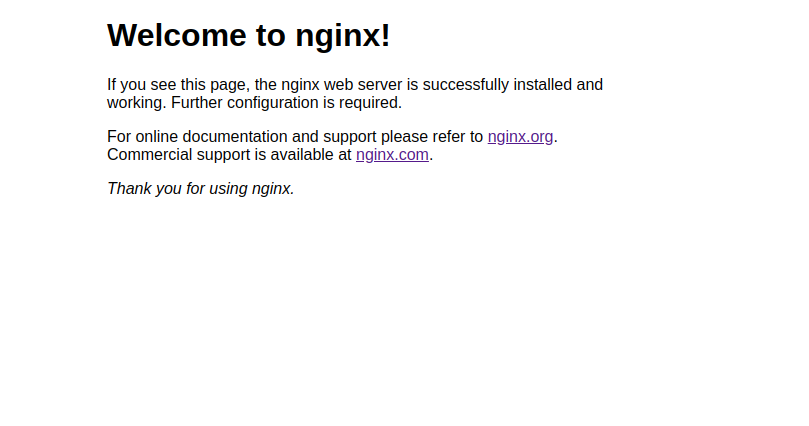
All set! You can verify a successful Nginx installation by browsing to your server’s IP Address. You should be seeing Nginx’s default welcome page as per the following screenshot.
How To Migrate from MongoDB Atlas to self-hosted Ubuntu 22.04 Server
In this article we will demonstrate how to install latest MongoDB on Ubuntu 22.04 server, migrate databases from MongoDB Atlas and further secure your MongoDB environment.
MongoDB is a popular open-source NoSQL database management system. It is designed for flexibility, scalability, and performance in handling a variety of data types; structured and unstructured.
The same people who built and manage MongoDB have launched MongoDB Atlas in 2016. Atlas is a fully-managed cloud database that can run on the cloud service provider of a user’s choice (AWS , Azure, and Google Cloud). It offers a convenient way to deploy, manage, and scale MongoDB databases in the cloud without the operational overhead of managing database infrastructure.
Despite the many advantages MongoDB has to offer, maintaining such service in AWS or Azure is expensive. Therefore developers and DBA’s turn to alternative, cheaper yet reliable hosting providers for their MongoDB hosting needs.
In this article we will demonstrate how to install latest MongoDB on Ubuntu 22.04 server, migrate databases from MongoDB Atlas and further secure your MongoDB environment.
Prerequisites
SSH access with root privileges on destination ubuntu server
Access to the source Mongodb Atlas Database
Step 1: Update system & Install Mongodb
Execute the following command to update you Ubuntu system with the latest packages:
root@localhost:~$ apt update -y
Then, install mongodb with the following command:
root@localhost:~$ apt install mongodb -y
Step 2: Create MongoDB user on Destination Server
This step is important as we will create a user which will be used for the migration process.
Use the following command to enter the mongo shell.
root@localhost:~$ mongo
Now use the following commands within the mongo shell:
When handling database migration tasks, you must always have a fresh copy of the working database. Migrating an database from an old backup is not a good idea as you will be missing, probably, a lot of new data!
So, use the following command to take a full backup of the database in source mongodb server:
Replace <source_host> with the IP or hostname of the source mongodb server, migrationUser and migrationPassword with the credentials used in Step 2, and <source_db> with the database name you are about to migrate.
Step 4: Transfer mongodb database to new server
We use the popular “scp” utility to transfer our database copy from the old server to the new one. Always remember that the first part of rsync syntax refers to the path on the source server and the last one to the path of the destination server.
Assuming we execute this command from our new server, the first part of the command should include the connection details to the source server. We will transfer the database to the root folder of our new Ubuntu server.
Important: If your database is on MongoDB Atlas, then you can use the mongodump command from Step 3 directly on your new Ubuntu server. In this case, you can skip the entire Step 4.
Step 5: Restore MondoDB Database
Now that you have your database on your destination server, use the following command to restore it:
Make sure to replace <db_name> with the name of your database and <source_db> with the name as transferred from the source server. In our example we transferred it in /root/ folder so in your case this may also need to be changed.
Step 6: Create User with Privileges on New Database
Use mongo command to enter the mongo shell:
root@localhost:~$ mongod
Create the user with the appropriate privileges for the database you just migrated:
Make sure to replace <destination_db> with the name of your newly migrated database.
Type exit to leave the mongo shell.
That’s it! We hope that this article helped you to migrate your MongoDB Atlas to your new self-hosted Ubuntu Server.
How NetShop ISP Improves Trading Infrastructure Resilience through Equinix LD7 Data Center Hosting
NetShop ISP launches purpose-built cloud & dedicated servers infrastructure within Equinix’s LD7 Data center for improving trading infrastructure resilience for Fintech companies and Forex brokers.
In the fast-paced world of forex trading, having reliable and high-performance servers is essential for success. Equinix LD7 Data Center stands out as a premier choice for businesses operating in these industries, offering a range of benefits that can significantly enhance performance, security, and scalability.
Check out how Equinix LD7 Data Center, combined with virtual or dedicated servers, can empower customers in the forex and fintech sectors.
Introduction to Equinix LD7 Data Center
Equinix LD7 Data Center, located in London, UK, is renowned for its state-of-the-art infrastructure and unparalleled connectivity. As one of the leading data center providers globally, Equinix ensures optimal reliability, security, and performance for businesses of all sizes.
Benefits of Equinix LD7 Data Center for Forex and Fintech
Proximity to Financial Markets Equinix LD7 Data Center is strategically located in close proximity to major financial markets, including the London Stock Exchange and key forex trading hubs. This geographic advantage ensures minimal latency and faster trade execution, giving traders a competitive edge.
Robust Connectivity Ecosystem Equinix LD7 Data Center boasts a diverse ecosystem of network service providers, cloud platforms, and financial exchanges. This interconnected environment enables direct access to a wide range of counterparties, liquidity providers, and trading platforms, facilitating faster data exchange and reducing latency.
Enhanced Security and Compliance Security is paramount in forex trading and fintech operations, where sensitive financial data must be protected from cyber threats and regulatory compliance requirements must be met. Equinix LD7 Data Center offers advanced security measures, including biometric access controls, video surveillance, and compliance certifications such as PCI DSS and ISO 27001.
Scalability and Flexibility Whether you’re a growing fintech startup or an established forex brokerage, scalability is essential to accommodate fluctuating demand and future expansion. Equinix LD7 Data Center provides scalable infrastructure solutions, allowing businesses to easily upgrade resources such as CPU, RAM, and storage capacity to meet evolving requirements.
Virtual vs. Dedicated Servers: Choosing the Right Solution
When it comes to hosting your forex trading platform or fintech applications in Equinix LD7 Data Center, you have the option to deploy virtual servers or dedicated servers.
Virtual Servers – VPS
Virtual servers, also known as virtual private servers (VPS), offer cost-effective and scalable hosting solutions. By leveraging virtualization technology, NetShop ISP provides Virtual servers which are deployed on a multi-node infrastructure for greater redundancy and scalability purposes.
Through NetShop ISP’s infrastructure in LD7, London we provide Virtual Servers for Forex brokers which are ideal for CRM hosting, Trading platform cloud instances and Access/Proxy servers.
Dedicated servers provide maximum performance, security, and control for mission-critical applications and high-traffic websites. With a dedicated server hosted in Equinix LD7 Data Center, you have exclusive access to the entire physical server, eliminating resource contention and ensuring consistent performance.
In conclusion, Equinix LD7 Data Center serves as a strategic partner for businesses operating in the forex and fintech industries, offering a robust infrastructure platform and a wide range of hosting solutions tailored to their specific needs. Whether you choose virtual servers or dedicated servers, Equinix LD7 Data Center provides the reliability, performance, and scalability required to thrive in today’s competitive landscape.
Contact a hosting specialist today for a free consultation or view more details about our Equinix LD7 Data Center here.
Introducing New Cutting-Edge VPS Plans: OKTAPLUS, HYPER, and TITAN Enhanced with NVMe Technology
NetShop ISP Announce New, NVMe-powered VPS Plans: OKTAPLUS, HYPER, and TITAN, offering increased performance and greater scalability.
In the dynamic realm of the e-commerce sector and digital ventures, the significance of high-performing virtual server hosting solutions cannot be overstated. As demands soar and technology evolves, NetShop ISP is thrilled to announce the launch of three new VPS plans: OKTAPLUS, HYPER, and TITAN.
These plans are designed to cater to the evolving needs of businesses, providing increased performance and greater scalability.
Key Features of OKTAPLUS, HYPER, and TITAN VPS Plans
Unmatched Performance: With up to 16 vCPU Cores, 32 GB RAM, and 1 TB Storage, our OKTAPLUS, HYPER, and TITAN VPS Plans deliver unparalleled performance for all types of software and applications.
Enhanced Cloud Infrastructure: Our upgraded cloud infrastructure empowers us to offer VPS servers with high-performance NVMe storage. Say goodbye to latency and slow loading times as our NVMe-powered servers ensure lightning-fast data access, giving your website or application a competitive advantage.
Scalability: Whether you’re experiencing sudden spikes in traffic or planning for long-term growth, our VPS plans are designed to scale effortlessly. Enjoy the flexibility to upgrade your resources on-demand, ensuring that your server always meets the demands of your evolving business.
Unlimited scalability is available when switching from fixed-specs plans to FlexiVPS+.
Global Reach: The three new VPS plans are currently offered in our UK Cloud region, and will soon be available in the rest of our global data center locations.
Unlock the Power of VPS Hosting Today
Ready to experience the next level of VPS hosting? Don’t miss out on the opportunity to elevate your online presence with NetShop ISP’s OKTAPLUS, HYPER, and TITAN plans.
Get started today and discover the difference that high-performance VPS hosting can make for your business. If you are not sure which plan suits your business needs, contact one of our hosting specialists via Skype (netshopisp) or drop us a message from here.
How To Install Let’s Encrypt SSL on Ubuntu Server 22.04 for Apache or Nginx
In this tutorial we will demonstrate the way to install LetsEncrypt on your Ubuntu server using certbot – an open-source tool for installing Let’s Encrypt certificates.
Let’s Encrypt is an open, automated certificate authority (CA) provided by Internet Security Research Group (ISRG) so that users can enable secure connection (https) on their websites for free, without hassle.
In this tutorial we will demonstrate the way to install LetsEncrypt on your Ubuntu server using certbot – an open-source tool for installing Let’s Encrypt certificates.
Pre-requisites to Install Certbot and Let’s Encrypt on Linux Server
The only prerequisite is to have ssh access with a root-privileged account on Ubuntu server with public internet access.
5 Easy Steps to Install Let’s Encrypt Certificate on Ubuntu Server 22.04 using Certbot
Step 1: Update System
Execute the following command to update your ubuntu server with the most updated packages.
root@localhost:~$ apt update -y
Step 2: Install Certbot
The following command will install certbot on your system.
root@localhost:~$ apt install certbot -y
Step 3: Install Certbot plugin for Apache or Nginx
If you are using Apache webserver then use the following command to install the respective certbot plugin for Apache.
root@localhost:~$ certbot --apache -d mydev.netshop-isp.com.cy
Saving debug log to /var/log/letsencrypt/letsencrypt.log
Requesting a certificate for mydev.netshop-isp.com.cy

Successfully received certificate.
Certificate is saved at: /etc/letsencrypt/live/my.netshop-isp.com.cy/fullchain.pem
Key is saved at:         /etc/letsencrypt/live/my.netshop-isp.com.cy/privkey.pem
This certificate expires on 2024-06-01.
These files will be updated when the certificate renews.
Certbot has set up a scheduled task to automatically renew this certificate in the background.

Deploying certificate
Successfully deployed certificate for admin.digibot.trade to /etc/apache2/sites-enabled/000-default-le-ssl.conf
Congratulations! You have successfully enabled HTTPS on https://my.netshop-isp.com.cy
We were unable to subscribe you the EFF mailing list because your e-mail address appears to be invalid. You can try again later by visiting https://act.eff.org.

- - - - - - - - - - - - - - - - - - - - - - - - - - - - - - - - - - - - - - - -
If you like Certbot, please consider supporting our work by:
 * Donating to ISRG / Let's Encrypt:   https://letsencrypt.org/donate
 * Donating to EFF:                    https://eff.org/donate-le
- - - - - - - - - - - - - - - - - - - - - - - - - - - - - - - - - - - - - - -
Step 5. Restart Web Server
Last step is to restart our web server so that the new configuration with SSL enabled are applied.
If you are using Apache then use this command:
root@localhost:~$ systemctl restart apache2
or the following command for Nginx web server:
root@localhost:~$ systemctl restart nginx
Congratulations! Your website is now secure with Free Let’s Encrypt SSL!
Navigating Forex Server Hosting: Key Distinctions from Conventional Providers
In this article we will outline the main differences between regular hosting providers and forex hosting providers, and why it can have such a huge impact on the success of an FX Broker’s operations.
Forex hosting providers specialize in offering hosting solutions that are tailored specifically for forex traders and brokers. The dynamic and fast-paced nature of the Forex industry requires certain optimizations that general hosting providers might not prioritize.
In this article we will outline the main differences between regular hosting providers and forex hosting providers, and why it can have such a huge impact on the success of an FX Broker’s operations.
Forex Hosting Providers vs. Regular Hosting Providers
Specialist Support
Forex hosting providers offer support teams knowledgeable about forex trading platforms and the technical requirements of traders and brokers. Excellent customer support is always essential, but having a team of industry experts is especially important for those operating in the Forex industry.
Forex hosting providers understand the specific needs of traders and can provide assistance accordingly, and this is a highly valuable asset for traders and brokers, ensuring that industry specific issues are handled efficiently.
Low Latency Infrastructure
Forex hosting providers will prioritise ultra-low latency connections to trading servers, so oftentimes they will have data centres situated within close proximity to major financial hubs around the globe. This is especially important for forex brokers and traders since it ensures minimal delays in order execution.
By opting for a Forex hosting provider you are also more likely to have greater network stability which reduces the risk of connectivity issues or interruptions, ensuring a more reliable trading experience.
Hardware Compatibility with Trading Platform Requirements
Oftentimes Forex hosting providers will tailor their hosting environments to facilitate popular trading platforms like MetaTrader 4 (MT4), MetaTrader 5 (MT5) and the XValley Exchanger. Since most traders are reliant on these platforms, opting for a hosting provider that adapts their servers to ensure the seamless functionality of these platforms is essential for performance and stability.
Maintenance Windows
In the Forex industry, disruptions can result in significant financial losses. Forex hosting providers are committed to maintaining a high uptime guarantee to ensure uninterrupted trading activities. Uninterrupted access to trading platforms is crucial for brokers and traders, so opting for a forex hosting provider who understands and prioritises the importance of this is essential for mitigating potential downtime.
Specialized Forex Hosting with NetShop ISP
Ensure reliable, fast and secure hosting for your MT4 or MT5 trading platforms with NetShop ISP Forex hosting solutions. With years of industry experience, NetShop ISP has perfected tailored hosting solutions specifically designed to meet the intricate demands of traders and brokers.
To speak with a specialist, visit our website here.
How to Install Nginx, MariaDB, PHP-FPM on AlmaLinux 9 Server (LEMP)
In this article we will provide a step-by-step guide to installing LEMP on your AlmaLinux 9 Server.
The LEMP stack is a popular web development stack consisting of four key components: Linux, Nginx, MySQL and PHP, each of which play a crucial role in web application development and hosting.
In this article we will provide a step-by-step guide to installing LEMP on your AlmaLinux 9 Server.
Prerequisites
Server with AlmaLinux 9 OS installed
SSH Access with root or sudo-privileged user
Steps to Install LEMP on AlmaLinux 9
Step 1: Switch to root user
First, switch to the root user using the following command. Unless stated otherwise, all subsequent commands must be executed as the root user.
jim@server:~$ sudo –i
Step 2: Install NGINX
Install Nginx by running the following command.
yum install nginx
Step 3: Enable NGINX on boot
Ensure Nginx is running and started on boot.
root@server:~$ systemctl enable --now nginx
Now let’s check the status of Nginx with the following command:
root@server:~$ systemctl status nginx
Sample Output:
● nginx.service - The nginx HTTP and reverse proxy server
     Loaded: loaded (/usr/lib/systemd/system/nginx.service; enabled; preset: disabled)
     Active: active (running) since Sun 2023-09-10 19:45:10 EEST; 5s ago
    Process: 1650 ExecStartPre=/usr/bin/rm -f /run/nginx.pid (code=exited, status=0/SUCCESS)
    Process: 1651 ExecStartPre=/usr/sbin/nginx -t (code=exited, status=0/SUCCESS)
    Process: 1652 ExecStart=/usr/sbin/nginx (code=exited, status=0/SUCCESS)
   Main PID: 1653 (nginx)
      Tasks: 3 (limit: 7462)
     Memory: 2.7M
        CPU: 14ms
     CGroup: /system.slice/nginx.service
             ├─1653 "nginx: master process /usr/sbin/nginx"
             ├─1654 "nginx: worker process"
             └─1655 "nginx: worker process"

Sep 10 19:45:10 almalinux systemd[1]: Starting The nginx HTTP and reverse proxy server...
Sep 10 19:45:10 almalinux nginx[1651]: nginx: the configuration file /etc/nginx/nginx.conf syntax is ok
Sep 10 19:45:10 almalinux nginx[1651]: nginx: configuration file /etc/nginx/nginx.conf test is successful
Sep 10 19:45:10 almalinux systemd[1]: Started The nginx HTTP and reverse proxy server.
Step 4: Install MariaDB
Next step is to install MariaDB by running the following command.
root@server:~$ yum install mariadb-server
Step 5: Enable MariaDB to start on boot
Ensure MariaDB is running and started on boot using the following command:
root@server:~$ systemctl enable --now mariadb
Now check the status of MariaDB by executing this command:
root@server:~$ systemctl status mariadb
Sample Output:
● mariadb.service - MariaDB 10.5 database server
     Loaded: loaded (/usr/lib/systemd/system/mariadb.service; enabled; preset: disabled)
     Active: active (running) since Sun 2023-09-10 19:48:07 EEST; 4s ago
        Docs: man:mariadbd(8)
              https://mariadb.com/kb/en/library/systemd/
     Process: 3249 ExecStartPre=/usr/libexec/mariadb-check-socket (code=exited, status=0/SUCCESS)
    Process: 3271 ExecStartPre=/usr/libexec/mariadb-prepare-db-dir mariadb.service (code=exited, status=0/SUCCESS)
    Process: 3370 ExecStartPost=/usr/libexec/mariadb-check-upgrade (code=exited, status=0/SUCCESS)
   Main PID: 3354 (mariadbd)
      Status: "Taking your SQL requests now..."
      Tasks: 15 (limit: 7462)
     Memory: 75.4M
        CPU: 376ms
     CGroup: /system.slice/mariadb.service
             └─3354 /usr/libexec/mariadbd --basedir=/usr

Sep 10 19:48:07 almalinux mariadb-prepare-db-dir[3310]: you need to be the system 'mysql' user to connect.
Sep 10 19:48:07 almalinux mariadb-prepare-db-dir[3310]: After connecting you can set the password, if you would need to be
Sep 10 19:48:07 almalinux mariadb-prepare-db-dir[3310]: able to connect as any of these users with a password and without sudo
Sep 10 19:48:07 almalinux mariadb-prepare-db-dir[3310]: See the MariaDB Knowledgebase at https://mariadb.com/kb
 Sep 10 19:48:07 almalinux mariadb-prepare-db-dir[3310]: Please report any problems at https://mariadb.org/jira
 Sep 10 19:48:07 almalinux mariadb-prepare-db-dir[3310]: The latest information about MariaDB is available at https://mariadb.org/.
Sep 10 19:48:07 almalinux mariadb-prepare-db-dir[3310]: Consider joining MariaDB's strong and vibrant community:
Sep 10 19:48:07 almalinux mariadb-prepare-db-dir[3310]: https://mariadb.org/get-involved/
 Sep 10 19:48:07 almalinux mariadbd[3354]: 2023-09-10 19:48:07 0 [Note] /usr/libexec/mariadbd (mysqld 10.5.16-MariaDB) starting as proces>
Sep 10 19:48:07 almalinux systemd[1]: Started MariaDB 10.5 database server.
Step 6: Install PHP-FPM
Next Install PHP FastCGI Process Manager by running the following command.
root@server:~$ yum install php-fpm
Step 7: Enable PHP-FPM on boot
Ensure that PHP FastCGI Process Manager is running and started on boot.
root@server:~$ systemctl enable --now php-fpm
You can check the status of the PHP FastCGI Process Manager with this command:
root@server:~$ systemctl status php-fpm
Sample Output:
● php-fpm.service - The PHP FastCGI Process Manager
     Loaded: loaded (/usr/lib/systemd/system/php-fpm.service; enabled; preset: disabled)
     Active: active (running) since Sun 2023-09-10 19:52:10 EEST; 5s ago
   Main PID: 3578 (php-fpm)
     Status: "Ready to handle connections"
      Tasks: 6 (limit: 7462)
     Memory: 8.1M
        CPU: 25ms
     CGroup: /system.slice/php-fpm.service
             ├─3578 "php-fpm: master process (/etc/php-fpm.conf)"
             ├─3579 "php-fpm: pool www"
             ├─3580 "php-fpm: pool www"
             ├─3581 "php-fpm: pool www"
             ├─3582 "php-fpm: pool www"
             └─3583 "php-fpm: pool www"

Sep 10 19:52:10 almalinux systemd[1]: Starting The PHP FastCGI Process Manager...
Sep 10 19:52:10 almalinux systemd[1]: Started The PHP FastCGI Process Manager.
Step 8: Assign nginx user for php-fpm
The default user under which php-fpm runs is Apache. In this case, we are using Nginx instead of Apache so we need to update the php-fpm configuration accordingly. Run the following command to open the php-fpm default configuration for editing.
root@server:~$ vi /etc/php-fpm.d/www.conf
Near the top of the file, you will see the following:
; Unix user/group of processes
; Note: The user is mandatory. If the group is not set, the default user's group
;       will be used.
; RPM: apache user chosen to provide access to the same directories as httpd
user = apache
; RPM: Keep a group allowed to write in log dir.
group = apache
Change the lines starting with user and group (see in bold) to the following:
user = nginx group = nginx
Step 9: Restart PHP-FPM
Save the file after you complete the previous step and exit, then restart php-fpm by running the following command.
root@server:~$ systemctl restart php-fpm
Step 10: Restart Nginx and PHP-FPM
Use the following commands to restart nginx and php-fpm:
systemctl restart nginx php-fpm
Congratulations! Now visit http://SERVER_IP/ (make sure to replace SERVER_IP with the IP of your server) and you should see the default NGINX landing page.
You have successfully installed LEMP (Linux, NGINX, MariaDB, PHP-FPM) on Almalinux 9 Server!
Deploy LEMP Server with NetShop ISP
NetShop ISP is a proud supporter of the AlmaLinux OS Foundation. We have been one of the first hosting providers to have included AlmaLinux in the list of supported Operating Systems.
How To Reset Forgotten MySQL 5.7 Root Pass in Linux
In this article we list all necessary steps for a working solution to reset your MySQL 5.7 root password.
Often linux users, and especially server admins, realize they have lost the mysql root pass. When managing databases this is a real issue as without the root password there is no much you can do in terms of database administration.
Whilst there are thousands of articles out there explaining the procedure to recover the password of mysql root user, you may be still facing an issue when trying to replicate the steps from those articles.
Recently, one of our server engineers were called on duty to recover a lost MySQL root password for a client’s CentOS server. In this article we list all necessary steps for a working solution to reset your MySQL root password.
Steps to Recover MySQL Root Account
Step 1: Stop MySQL Server
root@localhost:~$ service mysql stop
Step 2: Start MySQL with skipping grant privileges and networking
The first two commands below are usually omitted from other tutorials, and users are instructed to do only the 3rd command. However, in our case with MySQL 5.7 server we had to do all commands as shown below.
root@localhost:~$ mkdir -p /var/run/mysqld
The command above will create the directory /var/run/mysqld if doesn’t exist; that is the purpose of argument -p.
You are good to go! You should be able to access MySQL using your new root password as you set it in Step 4. Congratulations!
4 Things Web Developers Should Know about Virtual and Dedicated Server Hosting
In this article, we will outline the four main things that web developers should know before making their choice between virtual and dedicated server hosting.
For web developers, choosing between virtual and dedicated server hosting can be a tricky decision, but a significant one nonetheless. There are multiple factors that need to be considered in order to reach an informed conclusion, including the scale of potential projects, anticipated traffic, budget and technical requirements.
In this article, we will outline the four main things that web developers should know before making their choice between virtual and dedicated server hosting.
Performance
Generally speaking dedicated servers offer superior performance due to exclusive access to resources. A dedicated server will be the optimal choice for complex projects like video streaming or high-traffic e-commerce sites. Whilst virtual servers can also be efficient for most projects, a decrease in performance may be noted during periods of high traffic since resources are shared.
In terms of performance, a virtual server is better suited to small to medium-sized projects that don’t require constant, high resource allocation. Developers should consider the types of projects they intend to take on when choosing between dedicated and virtual server hosting to ensure consistent performance and stability.
Scalability
When considering scalability, there are some distinct differences between dedicated and virtual servers. Dedicated servers generally offer robust scalability by allowing developers to optimize resources exclusively for their application needs. However, scaling dedicated servers often involves physical upgrades, which can be time-consuming and costly.
On the other hand, virtual servers provide much more flexible scalability by allowing for rapid resource allocation and adjustments based on demand. Virtual servers offer scalability without the need for hardware changes, enabling developers to expand resources as and when required, making them an ideal choice.
Costs
Dedicated servers typically come with a higher initial cost due to their exclusive use and powerful hardware. However, they might offer web developers better long-term value for certain high-performance, resource-intensive applications.
Virtual servers present a more cost-effective option initially, as they share hardware resources among multiple users, reducing individual costs. A virtual server is the most cost-effective choice of the two, and may be more suitable for start-ups, freelance web developers or small businesses.
Security
In terms of security, both dedicated and virtual servers have their advantages. Since dedicated servers are exclusively allocated to a single user, the risk of security breaches from other users is diminished. Virtual servers, while sharing hardware resources, benefit from virtualization technology that provides a level of isolation. Ultimately, both dedicated and virtual servers can be secured effectively as long as appropriate security measures are implemented.
With all that being said, it’s important to align your hosting choice with your project requirements. Make sure to consider the specific needs of your project, including expected traffic, scalability demands, budget constraints, and security concerns.
The Best Hosting with NetShop ISP
Whether you need a dedicated server or a virtual server, NetShop ISP has hosting solutions to suit the needs of every business. Talk to one of our hosting experts today for a free consultation!
How to Install Docker Compose on Debian 12 Server
In this article, we will provide a step-by-step guide for installing Docker Compose on your Debian 12 Server.
Docker Compose is a tool for defining and running multi-container Docker applications through a single configuration file. In this article, we will provide a step-by-step guide for installing Docker Compose on your Debian 12 Server.
Difference between Docker and Docker Compose
The main difference between Docker and Docker Compose is that the Docker is command-line based (initial setup and execution) whilst Docker compose is based on configuration written in YAML file.
Another important difference is that Docker can run only one container at a time, whilst with docker-compose you can configure and run multiple containers at a time.
Prerequisites
In order to follow this guide, you will need the following:
1. Shell access to a Debian 12 Server machine with an admin user.
2. Must follow our guide for installing Docker on Debian 12 Server.
Steps to Install Docker Compose on Debian 12
Step 1 – Switch to Root User
First, switch to the root user using the following command. Unless stated otherwise, all subsequent commands must be executed as the root user.
john@localhost:~$ sudo –i
Step 2 – Update System
Check for available package updates by using the following command.
root@localhost:~$ apt update
Step 3 – Install Docker Compose plugin
Install the Docker Compose package plugin by running the following command.