Is Free Unlimited Hosting Secure?

When it comes to web hosting, the word ‘unlimited’ can mean a variety of things; unlimited bandwidth, unlimited disk storage, unlimited FTP accounts, unlimited addon domains and so on. It’s important when choosing your web hosting provider to clarify what unlimited actually means, and whether the resources you require are truly unrestricted.

Starting a new online business can come with quite a few expenses, and so it’s normal for website owners to want to get some freebies in the process. The words ‘free’ and ‘unlimited’ in the same sentence always has a nice ring to it, right?

In this article we’ll take a look at free unlimited web hosting, and how secure it actually is.

What is unlimited web hosting?

When it comes to web hosting, the word ‘unlimited’ can mean a variety of things; unlimited bandwidth, unlimited disk storage, unlimited FTP accounts, unlimited addon domains and so on. It’s important when choosing your web hosting provider to clarify what unlimited actually means, and whether the resources you require are truly unrestricted.

For website owners who want to host multiple sites, unlimited hosting could be the ideal solution to ensure no extra charges for the overuse of resources. Now, we know what you’re probably thinking, there must be a catch – can you really get all of those benefits completely free?

In essence, no – when choosing your web hosting provider you should most definitely try to find the best deal, but a completely free service may come with some major downfalls that could ultimately be detrimental to your website’s potential.

Disadvantages of free hosting

Security

Imagine spending a load of time creating your website, for it to not be properly secured by your hosting provider. Security is fundamental when it comes to the success of your website, and opting for free hosting hugely puts this at risk. With free hosting your website is vulnerable to attacks and security breaches, unlike with paid providers who have a higher duty of care to keep their clients websites safe.

If you’re still considering to opt for free hosting, you need to take a good look at the terms and conditions. It’s not unheard of for free hosting companies to close down without sufficient notice, meaning your website could be permanently lost.

Ads

You might still be wondering how web hosting providers can offer a completely free service, and the answer is they can’t. These companies still need to earn a living, and that’s usually where ads come in to play. By placing ads on your website, the hosting provider is able to make some money without you having to spend any – but you won’t have control over what ads are showing on your website.

Reputation

If you’re just starting out with your website, it’s important to create a trustworthy reputation in order to build a strong user-base. Apart from the ads on your website being damaging to your reputation, it’s also likely that your domain will include the free hosting companies name too. Users are becoming increasingly wary of this and, let’s be honest, it doesn’t give a great first impression.

Performance

Just like anything in life, you get what you pay for. Choosing free web hosting will most likely lead to your website being frequently unavailable with incomprehensive uptime SLAs. Not only will the performance of your website be affected by downtime, your SEO ranking will struggle too, with Google associating free web hosting with spam.

Customer Service

When it comes to hosting a website, the level of customer service you can expect to receive should be amongst your highest priorities. Opting for a free hosting provider will most definitely have a huge impact on the customer service they’re able to provide, and you’ll likely find yourself without the support you need.

Affordable Web Hosting with NetShop ISP

NetShop Internet Services is an award-winning Server Hosting Provider with privately owned infrastructure in various global locations. We’re delighted to offer our clients fast, reliable and affordable web hosting from as little as €5 per month.

Stick to a budget whilst keeping your websites secure with our Cyprus, Malta or United Kingdom Web Hosting services that come with the powerful cPanel, and the added benefits of a free SSL, domain name, and 24/7 customer support.

How to Increase the Maximum File Upload Size in WordPress (6 Easy Ways)

Learn how to increase the maximum file upload size in WordPress to allow you uploading large files and media content. In this article we explain 6 easy ways of how to do so.

WordPress is a powerful CMS used by millions of websites. Whilst its easy to get a WordPress website up and running, you may end up with the common problem of not being able to upload large files and media.

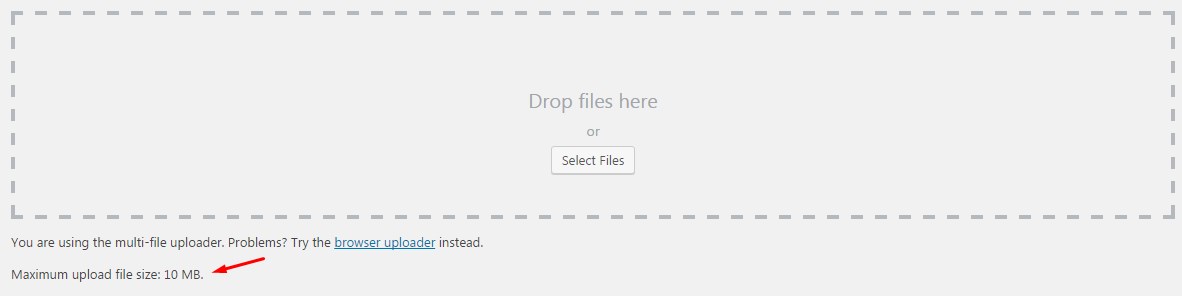
By default, the maximum upload size in WordPress is 2MB, although this value may vary among web hosting providers. To check what is the current max upload size limit in your WordPress website, do the following:

  1. Login to your WordPress admin area (WP Admin)
  2. From the left-side menu, navigate to Media > Add New
  3. You should see the value of max upload file size setting as shown in the screenshot below
How to check max upload file size in WordPress

If the current upload size limit does not meet your needs then you can continue reading this article where we will show you 6 easy ways of how to increase the maximum file upload size in WordPress.

1. Edit the .htaccess file

To access the .htaccess file you will need to connect on your hosting environment via FTP client, such as Filezilla, and navigate to the folder where WordPress is installed. Open the .htaccess file in your preferred code edit, or simply with Notepad, and add the following lines.php_value upload_max_filesize 64M

php_value post_max_size 128M
php_value memory_limit 256M
php_value max_execution_time 300
php_value max_input_time 300

The above lines will define the max upload size in megabytes so feel free to adjust the numbers as per your needs.

2. Edit Functions.php file

If you are not able to access or edit the .htaccess file then there is an alternative option.

Increase the size limits of max upload file size by adding the following lines in the functions.php file of your theme.

@ini_set( 'upload_max_size' , '64M' );
@ini_set( 'post_max_size', '64M');
@ini_set( 'max_execution_time', '300' );

Important: If you update your theme the above changes will be gone, so make sure you add them again after you update your theme or install a new one.

3. Edit settings in php.ini file

Changing the upload max filesize and increasing the memory limit can also be done through the php.ini file. In fact, this is one of the most common ways of doing this.

With the help of an FTP client (or SSH for those who have more experience) access the root directory of your WordPress site and look for the php.ini file. If you cannot find it then you will need to create it first.

Open any text editor and create a new file with the following lines of code. Once done save the file and upload it back to the root of your WordPress directory.

upload_max_filesize = 25M
post_max_size = 13M
memory_limit = 15M

4. Edit wp-config.php file

Another way of increasing the upload size in WordPress is to define the size parameter in the wp-config.php file. To do that, access your WordPress root directory using SSH or FTP and locate a wp-config.php file.

Open the file in any text editor and add the following code.

@ini_set( 'upload_max_size' , '20M' );
@ini_set( 'post_max_size', '13M');
@ini_set( 'memory_limit', '15M' );

Save your changes and it should increase your file upload size.

5. Use the Increase Max Upload Filesize Plugin

If you are not familiar with server-side commands and therefore not confident to use any of the above options, there is a WordPress plugin available that will help you get the job done easily.

The plugin’s name is  Increase Max Upload Filesize. To get this plugin installed please follow the steps below:

  1. Login to your WordPress Admin area
  2. From the left-side menu go to Plugins > Add new
  3. Search for “Increase Max Upload Filesize”, then install and activate it.
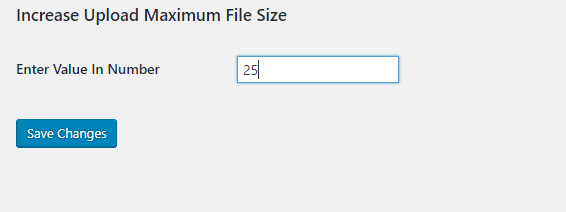
  4. Once activated, go to the plugin’s settings and simply enter your desired value for upload size. An example is shown in the screenshot below.
How to change the upload maximum file size with the WordPress plugin

6. Contact your Web Hosting Provider

Since this change is considered to be server-side, you can always contact your web hosting provider to do this change on your behalf.

If you have a web hosting account with NetShop ISP then we can help you free of charge as all our web hosting customers enjoy the privileges of fully managed web hosting. This means that you can contact us at any time with any technical or WordPress-related support and we will assist you without extra charges.

How to choose the best Reseller Web Hosting

If you’re trying to launch a Web Hosting business and are wondering which route to take, Reseller Web Hosting could be the right option for you. This increasingly popular business model offers an easy solution for those seeking to effectively establish a hosting provider business, by partnering with a company who already has the necessary infrastructure in place.

If you’re trying to launch a Web Hosting business and are wondering which route to take, Reseller Web Hosting could be the right option for you. This increasingly popular business model offers an easy solution for those seeking to effectively establish a hosting provider business, by partnering with a company who already has the necessary infrastructure in place.

What is Reseller Web Hosting

Venturing into the world of Hosting Providers can be daunting – after all, there’s a lot that needs to be taken into consideration when setting up a successful web hosting business. Reseller hosting offers individuals the opportunity to launch a web hosting business, without having to handle any of the major components – like hardware, for instance.

So how exactly does it work? It’s pretty simple – in essence you purchase web hosting services in bulk from a provider, rebrand it as your own, and then sell your services on to your own client-base.  

Benefits of Reseller Web Hosting

There are many advantages to Reseller Web Hosting, here are our top three.

Cost

As we mentioned, Reseller Hosting is a great option for those looking to set up a hosting business on a budget. Not only do you forgo all of the initial set up costs and investments, but you may also be surprised to find out that Reseller Hosting plans are actually quite cheap. Overall, Reseller Web Hosting is an extremely cost effective way of setting up a hosting business. 

Management

Opting for Reseller Hosting means the technical aspects are all taken care of for you, allowing you to focus your attention on growing your business. Not having the responsibility of physical server maintenance and management is a huge benefit.

Scalability

Logistically, starting out with any new business venture is tricky. Reseller Web Hosting offers you a simple way to scale your resources as your business grows so that you can accommodate more customers. Reseller hosting is a viable way to set up and seamlessly grow a business with minimal upfront expenses throughout the entire process.

How to choose the best Reseller Web Hosting

Choosing the right hosting provider will be one of the biggest determining factors to the success of your reseller hosting business. Here’s what to look for.

cPanel and WHM

Opt for a web host who provides the simple and intuitive cPanel and WHM, making it a whole lot easier for you to manage your reseller account.

At NetShop ISP, we provide the cPanel license free of charge and you can customize the cPanel theme with your own logo so that our identity is completely hidden from your customers. We even provide a free domain name of your choice with every annual Reseller Hosting Plan.

Fully Managed

Choosing fully managed Reseller Web Hosting means your only concern is building your business. All server management tasks are taken care of for you, and you should also make sure that your web host provides round-the-clock support too!

We are delighted to provide 24/7 technical support to our Resellers – free of charge. So whether you need assistance with your Reseller account, or any of your customers are encountering issues, NetShop is on hand to help.

Performance

High performance is key for your business to reach its full potential so choosing a web host that guarantees high uptime SLAs is essential.

NetShop ISP guarantees 99.9% network uptime which covers all of the websites under your Reseller Hosting account.

Reseller Web Hosting with NetShop ISP

Start making money with Reseller Web Hosting quickly and efficiently with NetShop ISP. Our Reseller Web Hosting plans are offered in Cyprus, Malta, the United Kingdom, the Netherlands and the United States and start from as little as €25.00 a month when you opt to pay annually!

We have years of experience working with Resellers and are experts in the Web Hosting Industry. Speak to a member of our team today to get your business up and running!

What is Minecraft Server Hosting

In 2021, Minecraft celebrates 10 years since it was released. In this article we explain what is Minecraft Server Hosting and what you need to look for the best gaming hosting experience.

2021 marks 10 years since Minecraft was released, with the game’s popularity increasing steadily every year. With over 120 million active players worldwide it comes as no surprise that they want to get the most out of their gaming experience.

Let’s take a look at what Minecraft server hosting is and why it’s so popular.

What is Minecraft

If you’re reading this, we’re sure you already know what Minecraft is. The multi-platform adventure game, developed by Mojang, allows players to build their own virtual world. Minecraft is a multiplayer sandbox game that’s extremely flexible, versatile and has a wide age group of players – with some schools even using the game for educational purposes.

What is Minecraft server hosting

The success of Minecraft has developed into a huge online community. As we mentioned, Minecraft is both a single and multi-player game and in order to connect with a multitude of players, a server is required. As seamless gaming experiences have now become the industry standard, many players are looking to virtual and dedicated servers to achieve this.  

Minecraft server hosting is basically a central server which hosts the gaming software, allowing users to connect and play. Opting for your own Minecraft server offers you control over how the game is set-up, how many players are able to join and general customization.

How to choose Minecraft server hosting

Powerful CPU

When choosing a Minecraft server, the CPU is actually one of the most important things to consider. Minecraft is extremely dependent on the CPU so choosing the right processor is crucial.

A higher clock speed (GHz) ultimately maximizes performance, reduces lagging and therefore results in a better gaming experience.

DDoS Protection

Gaming, and Minecraft in particular, is especially vulnerable to DDoS attacks. These attacks are executed by sending fake traffic to a server in an attempt to overwhelm it and ultimately render it unavailable. Make sure to choose a server equipped with DDoS Protection to avoid any downtime.

SSD

If you’re aiming to play with a lot of players, an SSD is the only way to go. An SSD clearly has the edge over a HDD and storage is definitely important for your Minecraft server. With an SSD your games will boot faster, maps will load quicker and load times will be drastically less.

Improve your gaming performance further and opt for the newer NVMe SSD that heavily reduces loading times. This relatively new technology hugely improves the performance and user experience.

RAM

Generally speaking, when it comes to Minecraft, the more RAM the better. You need to take this into consideration as it directly affects the amount of players that can be allowed to play without experiencing any issues. Minecraft is typically known as a RAM-hungry game so the amount you opt for should be dependent on the amount of players you’re planning on supporting.

Customer Support

Probably one of the biggest benefits of opting for a Minecraft server is the added security of having technical support. Choose a hosting provider that offers 24/7 support and be rest assured that any issues will be taken care of for you.

Minecraft Server Hosting with NetShop ISP

Choose your own dedicated server from NetShop ISP and configure it to your preferences for the ultimate gaming experience. Benefit from unlimited bandwidth, 99.9% uptime SLA and round-the-clock customer support.

For more information, get in touch with our team.

Best Forex VPS Hosting in 2021

Whether you’re new to Forex trading, or have been in the industry for a while, we’re sure you’ve heard about VPS hosting. In this article we take a closer look at the best Forex VPS hosting in 2021, and everything you should consider when choosing your provider.

As the largest financial market in the world, the Forex industry trades trillions every single day. It’s the only market to trade 24 hours a day, 5 days a week, so it’s crucial for Forex traders to have powerful infrastructure in place in order to be successful in such a fast-paced industry.

Whether you’re new to Forex trading, or have been in the industry for a while, we’re sure you’ve heard about VPS hosting. So let’s take a closer look at the best Forex VPS hosting in 2021, and everything you should consider when choosing your provider.

What is VPS

A Virtual Private Server (VPS) has become one of the most popular hosting choices for Forex traders. A VPS is a form of hosting where multiple users use the same physical server, however hypervisor technology is used to completely isolate them from each other; effectively creating multiple Virtual Servers that each run independently.

In essence, a VPS simulates a dedicated server, meaning that things like RAM, CPU and other data isn’t shared with any other users. It’s a powerful hosting choice with plenty of benefits, especially for Forex traders.

Benefits of Forex VPS Hosting

Let’s take a closer look at some of the benefits of Forex trading via VPS.

Low latency 

In the Forex industry, time is literally money. A Forex VPS ensures minimal slippage and fast execution, increasing the chances of achieving your desired quote.

By opting for a VPS, traders are able to seamlessly execute both manual and automated trading without worrying about high latency.

Security

Forex traders require a heightened level of security, and that’s exactly what Forex VPS hosting provides. Choosing a Forex VPS ensures that the required framework and security protocols are in place for safe trading – ultimately safeguarding you from any security breaches. With a VPS you can be rest assured that it’s dedicated solely to you, without worrying about being affected by others on the server. Make sure to opt for a VPS hosting provider that offers full access with administrator logins. 

Accessibility

It’s commonplace for Forex traders to travel and work remotely around the world. That’s just another reason why a VPS is ideal – it allows remote access. A Forex VPS offers you the flexibility to trade anywhere, anytime using just your VPS login credentials.

Ultimately, using a VPS lets you achieve faster and safer Forex trades, wherever you may be. So, now that we’ve covered some of the advantages of a Forex VPS, let’s take a look at what you need to consider when choosing the best VPS hosting in 2021.

How to choose the best Forex VPS

Location

It’s extremely important to choose a Forex VPS located close to your Forex Brokers server in order to ensure higher reliability and faster execution.

NetShop ISP’s Forex VPS infrastructure is ideally located in prime financial locations such as the Netherlands, Singapore and the United Kingdom.

Customer Support

Opt for a provider who offers 24/7 support, allowing you to focus on trading whilst any other issues are taken care of for you.

At NetShop ISP, our Windows admins are available around the clock, all week, through a variety of contact channels.

Compatible with any EA

If you’re using an Expert Advisor (EA), a Forex VPS is without a doubt the best option for you to ensure your platform stays online in the event of power outages or connectivity issues.

A Windows VPS allows you to make money in your sleep, so make sure to choose a VPS that is compatible with any EA. Our Forex VPS work with any Forex Broker and come with MetaTrader 4 (MT4) and  MetaTrader 5 (MT5) pre-installed, meaning you can start trading straight away!

Reliable and Affordable Forex VPS hosting with NetShop ISP

At NetShop ISP, we offer a wide range of infrastructure solutions for the financial market, with data centres located in key financial hubs around the world.

We’re pleased to offer a variety of affordable FX plans starting from just €9.99 p/m. If you need help finding the right one to suit your needs, please get in touch with our team here.

We also offer instant VPS activation, so if you’ve found the right plan for you, we can get it up and running in just one minute!

Malta VPS vs. Dedicated Server: Which one is best for you

In this article we will help you understand the main differences between Malta VPS and Malta Dedicated Server in order to make the best choice according to your budget and business needs.

When you’re deciding between a Malta VPS and a Malta dedicated server, there are a few things you need to consider regarding your business plans and requirements. Although it might seem tempting to go for the cheap option, it’s important to weigh up the benefits first.

In this article we’ll take a look at the potential pros and cons of both a Malta VPS, a Malta dedicated server, and the benefits of Malta as a hosting location.

What is a Dedicated Server

As the name suggests, a dedicated server is a single server dedicated solely to one user. So if you opt for a dedicated server, you’ll be the only one to use all of the hardware and resources. Dedicated servers are the ultimate hosting choice, especially for websites that experience high volume traffic.

What is a VPS

In some respects, a VPS (Virtual Private Server) is a lot like a dedicated server. A Virtual server is considered the middle ground between shared hosting and a dedicated server. Like shared hosting, it hosts multiple websites on one single server. However, hypervisor software is used to completely isolate them from each other and allocate them a set amount of resources – creating multiple Virtual servers. This environment somewhat imitates a dedicated server and has become an increasingly popular hosting choice.

VPS vs. Dedicated Server

Both a virtual server and a dedicated server have many benefits, so it’s important to have a clear understanding of your business requirements, and use that as a foundation for your decision.

Cost

A VPS is definitely the less expensive option of the two, since you don’t have control over the hardware and are allocated less resources. A dedicated server is a premium service and therefore comes at a higher price.

Performance

To put it bluntly, more resources equals better performance. A dedicated server can handle huge traffic spikes without it affecting page loading times. Although a virtual server is also very powerful and performs well with an influx of traffic, a dedicated server will always have a performance advantage. 

Control & Security

A dedicated server provides full access to server settings and allows you to configure it to suit your needs. As you have the whole server to yourself, you’re also a lot less vulnerable to security threats. A VPS also offers a high level of control over the configuration and management and on this point doesn’t differ too much to a dedicated server.

Benefits of Malta as a hosting location

With more and more businesses using Malta as an offshore hosting location, you may be wondering why it’s such a popular choice. Here are a few reasons why to choose Malta as a hosting destination:

Low risk of natural disasters

Choosing a safe and secure hosting location is really important to ensure that your server doesn’t experience any disruptions. Malta is the safest country in Europe and the second worldwide in terms of natural disasters. Not only that, the country also has strong infrastructure in place in the unlikely event that something was to occur.

Malta is a business destination

Malta may be the EU’s smallest member state, but it’s a big business hub! Malta’s ideal location not only makes it safe from natural disasters, but also a popular and strategic business location.

Malta’s tax system makes the country an attractive location for international businesses, where the corporate tax rate can be as little as 5% due to the intricate system. Along with that, access to the EU’s various trade treaties makes the small country very advantageous to businesses looking to incorporate in Europe.

Malta is an iGaming hub

Not only is Malta a global business destination, the country has also become an extremely popular, industry-leading iGaming hub due to its convenient regulations and extensive innovation. Malta was amongst the first countries to embrace iGaming, with many well-known names in the Online Gaming industry now located there.

Hundreds of iGaming companies now operate in Malta and the betting industry as a whole makes up over 12% of the country’s GDP – and it seems that this is just the beginning.

NetShop ISP was a ranked finalist in the ‘Best Hosting Services’ Award category at the Malta Gaming Awards 2019.

Malta Server Hosting with NetShop ISP

For more information on Malta VPS hosting, Malta dedicated servers, Malta web hosting or any other service, get in touch with our team. 

How To Upgrade Ubuntu 18.04 to 20.04 LTS using command line

In this article we will show you an easy and fast way on how to upgrade your Virtual or Dedicated server from Ubuntu Linux 18.04 LTS or 19.10 to Ubuntu 20.04 LTS using the apt / apt-get command

Ubuntu 20.04.2.0 LTS (Focal Fossa) is the current latest stable version the Ubuntu OS. LTS stands for long-term support, which means five years, until April 2025, of free security and maintenance updates, guaranteed.

In this article we will show you an easy and fast way on how to upgrade your Virtual or Dedicated server from Ubuntu Linux 18.04 LTS or 19.10 to Ubuntu 20.04 LTS using the apt / apt-get command.

Step 1 – Make a Backup

Using Acronis Cloud Backup you can easily backup your entire Ubuntu server or choose specific files/folders which you do not wish to lose in case something goes wrong.

If you wish to use any other backup software you are free to do so, just make sure your data are placed in an offsite/off-server repository. With Acronis Backup, your data will be hosted in Acronis’ cloud datacenter and can be easily restored/recovered to a new server.

Step 2 – Upgrade all installed packages on Ubuntu 18.04 LTS

Once you have completed your existing Ubuntu server’s backup process, you can begin with the OS upgrade.

Using a root-privileges account type the following commands:

sudo apt update
sudo apt list --upgradable
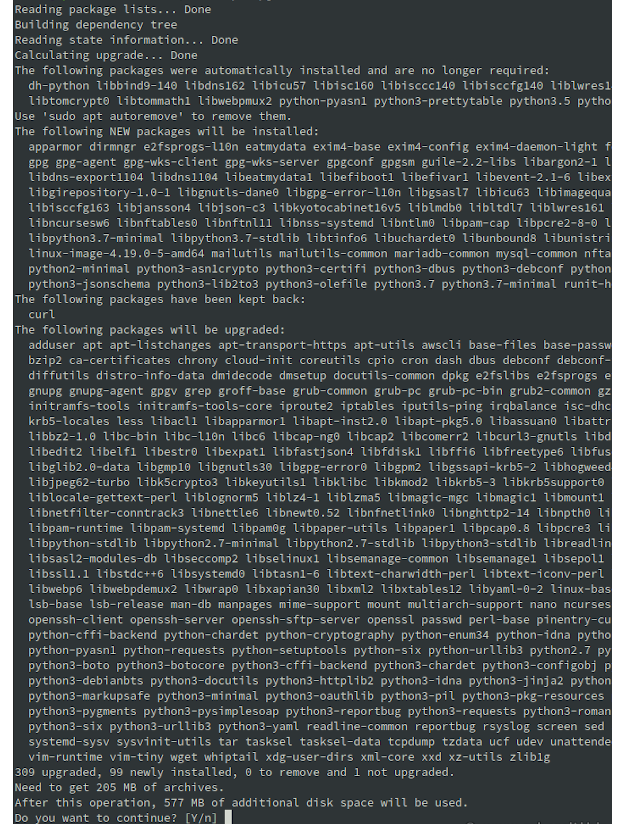
sudo apt upgrade

and then type ‘Y’ to continue when prompted

Sample Outputs:

Hit:1 http://cy.archive.ubuntu.com/ubuntu bionic InRelease Get:2 http://cy.archive.ubuntu.com/ubuntu bionic-updates InRelease [88.7 kB] Get:3 http://cy.archive.ubuntu.com/ubuntu bionic-backports InRelease [74.6 kB] Get:4 http://cy.archive.ubuntu.com/ubuntu bionic-security InRelease [88.7 kB] Fetched 252 kB in 2s (113 kB/s) Reading package lists… Done Building dependency tree Reading state information… Done 53 packages can be upgraded. Run 'apt list --upgradable' to see them. Reading package lists… Done Building dependency tree Reading state information… Done Calculating upgrade… Done The following NEW packages will be installed: motd-news-config The following packages will be upgraded: base-files bcache-tools cloud-init cryptsetup cryptsetup-bin dirmngr friendly-recovery gnupg gnupg-l10n gnupg-utils gpg gpg-agent gpg-wks-client gpg-wks-server gpgconf gpgsm gpgv initramfs-tools initramfs-tools-bin initramfs-tools-core iproute2 libaudit-common libaudit1 libc-bin libc6 libcryptsetup12 libnetplan0 libnss-systemd libpam-modules libpam-modules-bin libpam-runtime libpam-systemd libpam0g libpcap0.8 libsystemd0 libudev1 locales lshw multiarch-support netplan.io nplan pollinate python3-distupgrade python3-httplib2 sosreport systemd systemd-sysv ubuntu-minimal ubuntu-release-upgrader-core ubuntu-server ubuntu-standard udev update-notifier-common 53 upgraded, 1 newly installed, 0 to remove and 0 not upgraded. Need to get 16.9 MB of archives. After this operation, 13.3 kB of additional disk space will be used. Do you want to continue? [Y/n] Y

Upon completion, reboot your server by issuing the following command:

sudo reboot

Step 3 – Remove unused old kernels from Ubuntu 18.04

Run the following command:

sudo apt --purge autoremove

Sample Outputs:

Reading package lists... Done Building dependency tree        Reading state information... Done The following packages will be REMOVED:   linux-headers-4.15.0-45* linux-headers-4.15.0-45-generic*   linux-image-4.15.0-45-generic* linux-modules-4.15.0-45-generic*   linux-modules-extra-4.15.0-45-generic* 0 upgraded, 0 newly installed, 5 to remove and 0 not upgraded. After this operation, 334 MB disk space will be freed. Do you want to continue? [Y/n] y (Reading database ... 138353 files and directories currently installed.) Removing linux-headers-4.15.0-45-generic (4.15.0-45.48) ... Removing linux-headers-4.15.0-45 (4.15.0-45.48) ... Removing linux-modules-extra-4.15.0-45-generic (4.15.0-45.48) ... Removing linux-image-4.15.0-45-generic (4.15.0-45.48) ...

At this point you need to install the Update Manager on server as it may or man not installed on your server.

Do so by executing the following command:

sudo apt install update-manager-core

Step 4 – Upgrade Ubuntu Linux to latest 20.04 LTS

Execute the following command:

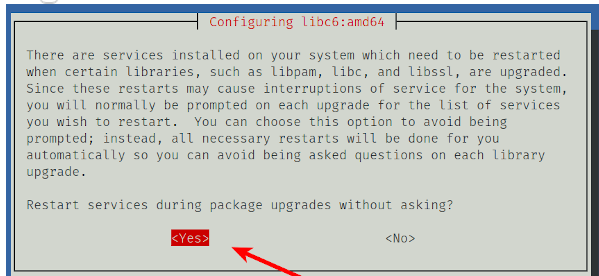
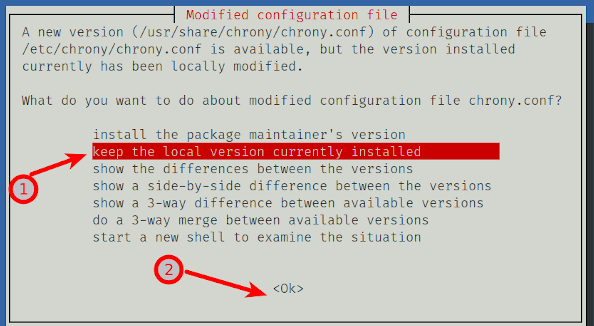
sudo do-release-upgrade

You might notice the following message appearing after you issue the above command:

Checking for a new Ubuntu release
There is no development version of an LTS available.
To upgrade to the latest non-LTS develoment release 
set Prompt=normal in /etc/update-manager/release-upgrades.

In that case, re-execute the command with the -d option appended in order to get the latest supported release forcefully:

sudo do-release-upgrade -d

Sample Outputs:

Reading cache
 
Checking package manager
 
Continue running under SSH? 
 
This session appears to be running under ssh. It is not recommended 
to perform a upgrade over ssh currently because in case of failure it 
is harder to recover. 
 
If you continue, an additional ssh daemon will be started at port 
'1022'. 
Do you want to continue? 
 
Continue [yN] y
 
Starting additional sshd 
 
To make recovery in case of failure easier, an additional sshd will 
be started on port '1022'. If anything goes wrong with the running 
ssh you can still connect to the additional one. 
If you run a firewall, you may need to temporarily open this port. As 
this is potentially dangerous it's not done automatically. You can 
open the port with e.g.: 
'iptables -I INPUT -p tcp --dport 1022 -j ACCEPT' 
 
To continue please press [ENTER]

No valid mirror found warning:

Updating repository information
 
While scanning your repository information no mirror entry for the 
upgrade was found. This can happen if you run an internal mirror or 
if the mirror information is out of date. 
 
Do you want to rewrite your 'sources.list' file anyway? If you choose 
'Yes' here it will update all 'bionic' to 'focal' entries. 
If you select 'No' the upgrade will cancel. 
 
Continue [yN]

Just say Yes (y) to use the official Ubuntu repo.

You are almost done. Once prompted with the following message press ‘y’ to finish the Upgrade and get your server rebooted.

System upgrade is complete.

Restart required 

To finish the upgrade, a restart is required. 
If you select 'y' the system will be restarted. 

Continue [yN] y
Connection to 52.xxx.yy.zz closed by remote host.
Connection to 52.xxx.yy.zz closed.

Step 5 – Ubuntu OS Upgrade Verification

Check your Distro version by running the following command:

lsb_release -a

Sample outputs:

No LSB modules are available.
Distributor ID:	Ubuntu
Description:	Ubuntu 20.04 LTS
Release:	20.04
Codename:	focal

Verify Linux kernel version and other log files too:

tail -f /var/log/my-app.log
uname -mrs

Sample outputs:

Linux 5.4.0-24-generic x86_64

Congrats! Your Ubuntu server has now been successfully upgraded to Ubuntu 20.0.4 LTS!

Not comfortable with Linux Systems administration? Let us do it for you!

NetShop ISP’s experienced Linux system admins can help you with full server management, whether it’s a virtual or a dedicated server. From Operating System installations, troubleshooting and OS distro upgrades, we can take care the whole aspect of your linux machine’s administration.

Browse our VPS Plans and Dedicated Servers to find the server that satisfies your needs and budgets and get started!

Dutch and Belgian Gambling Regulators Join Forces to Enhance their Regulatory Capabilities

The Belgian and Dutch gambling regulators have announced a partnership to share information, and strengthen regulatory and market monitoring capabilities. ditch

The Belgian and Dutch gambling regulators have announced a partnership to share information, and strengthen regulatory and market monitoring capabilities. 

Belgium’s gaming commission Kansspelcommissie (BGC), and the Netherland’s gambling regulator Kansspelautoriteit (KSA), will also be working together to ensure market integrity, improve anti-money laundering (AML) efforts, and tackle gambing addiction. 

Regarding the collaboration BGC President, Magali Clavie, commented: “Online games of chance are offered across borders. As a result, there is a greater need for international cooperation between regulators on (online) games of chance. Information exchanges with foreign colleagues are always very instructive.”

While René Jansen, chairman of the board of directors of the KSA, added: “Such a memorandum of understanding forms a good basis for sharing knowledge, collaboration and a smooth exchange of information. At the same time, a clear signal is being sent to providers of games of chance that they are joining forces internationally.”

The KSA also has agreements in place with other regulators, including the Swedish Gambling AuthorityMalta Gaming Authority, and France’s L’Autorité Nationale des Jeux.

On 1 April, the Dutch Remote Gaming Act is scheduled to come into force, allowing operators to submit applications for a license to offer online games of chance in the Netherlands.

Source: https://ayo.news/2021/03/11/belgian-dutch-regulators/

iGaming Dedicated Servers in Amsterdam (Netherlands)

Amsterdam is the fastest growing data center market in Europe, the Amsterdam region is considered the Digital Gateway to Europe. Our Netherlands Data Center (NSAMS01) is located in Amsterdam Southeast area and is designed based on the UTI Tier III standard, which means 2N redundancy on all critical systems, delivering extremely high levels of service availability. 

All our Netherlands Dedicated Servers come with 24/7 Free Technical Support, Free Hardware Replacement and full root/admin access so you can have full control of your server and software.

Contact us today for a custom dedicated server quote or a consultation regarding your online gaming infrastructure in The Netherlands.

NetShop ISP Announces New Reseller Web Hosting Plans

NetShop Internet Services Ltd, a leading web hosting provider with its headquarters in Cyprus, announces today the availability of new Reseller Web Hosting plans.

NetShop Internet Services Ltd, a leading web hosting provider with its headquarters in Cyprus, announces today the availability of new Reseller Web Hosting plans.

Resellers can now choose their desired plan among three affordable plans (Bronze, Silver, Gold) – all powered by cPanel/WHM, the best control panel for reselling and managing web hosting accounts.

Reseller hosting is the most popular way for anyone to start an online business in the hosting industry, without any technical knowledge required. NetShop ISP’s Reseller Web hosting comes as Fully Managed at zero additional cost. This means that we will cover all the technical and server management aspects so you can focus on running your business and selling web hosting accounts.

Moreover, the new Reseller Web Hosting plans offer the following advantages:

White Label / Own Branding

Your clients will see your own business logo and custom nameservers – they will never know or see NetShop ISP’s name.

SSD Storage

All our web hosting servers run on SSD disks so your customers can host websites and applications that load really fast

Softaculous 1-Click App Installer

We provide for free the popular Softaculous plugin where you and your customers can install any script and Content Management System in a single click.

Multiple Backup Options

A Backup service can be chosen should you wish to have daily, weekly or monthly backup and ensure that your clients and websites will never be left hanging in case of a disaster.


Multiple Server Locations

Our new Reseller hosting plans are offered in Cyprus, Malta, United Kingdom, Netherlands and the United States. Depending where your target audience resides, you can choose the location of preference and start setting up web hosting accounts for your customers.

Month-to-month Billing

Resellers are welcomed to sign up for any Reseller web hosting plan on a monthly basis. There is no long-term commitment and you can cancel at any time.

Start your Web Hosting Business Today

Our Customer Service representatives are standing by to hear from you and help to get your new web hosting business started. Chat with us on Livechat or send us an email to sales [at] netshop-isp.com.cy.

Former Malta Gaming Authority’s CEO Heathcliff Farrugia Accused of Conspiracy

Former Malta Gaming Authority (MGA) CEO Heathcliff Farrugia is facing criminal charges following an investigation into trading in influence with casino owner Yorgen Fenech.

Former Malta Gaming Authority (MGA) CEO Heathcliff Farrugia is facing criminal charges following an investigation into trading in influence with casino owner Yorgen Fenech

The investigation and court action against the former gaming regulator were kept under wraps as the facts of the case put Malta’s gaming industry in a bad light. 

Farrugia resigned in October last year shortly after he was questioned by police over his communication with Fenech, who served as CEO of Tumas Gaming and the Portomaso Casino. Karl Brincat Peplow, the chief officer in charge of authorization, had also resigned.

Former MGA’s CEO Heathcliff Farrugia (left) and Yorgen Fenech (right) who ran the Tumas Gaming casinos (source: timesofmalta.com)

Police sources told Times of Malta that Farrugia was found to have communicated “at some length” with Fenech. The communication is understood to include commercially sensitive information concerning rival casino operators, as well as a discussion on an anti-money laundering inspection that was carried out on Fenech’s Portomaso Casino.

The information emerges from an in-depth analysis of Fenech’s phone, which was seized by police investigators when he was arrested in 2019 over allegedly commissioning the murder of investigative journalist Caruana Galizia.

Source: https://timesofmalta.com/articles/view/former-gaming-ceo-charged-over-yorgen-fenech-contact.856558

7 Rules on How to Protect your Business and your Customers with IT Business Continuity and Disaster Recovery (BCDR)

In light of the recent fire at OVH Datacenter in France, we reveal the 7 Rules on how to protect your Business and Customers with the right Business Continuity and Disaster Recovery plan.

The fire occurred a couple of days ago at OVH’s Datacenter in France, caused hundreds of thousands of websites going offline with a huge impact on businesses, IT service providers, cloud & hosting companies, and of course thousands of consumers.

In light of that event, online businesses are now in search for new Data Centers to get their websites back online and for the right technology partner to provide them with a solid Business Continuity and Disaster Recovery plan.

The concept of IT Business Continuity and Disaster Recovery
(BCDR) is not new; however actual implementation varies across
solutions, vendors, and industries. Let’s take a look.

Why Do You Need a Business Continuity and Disaster Recovery Plan?

1. Surviving unplanned events

Many kinds of events can cause interruption or degradation of IT service: natural disaster, technology failures, user errors, etc. While natural disasters, terrorist acts, or malicious data breaches certainly are more known, operational events – not disasters – are the leading cause of IT outages. According to Forrester Research, a simple loss of power is still the leading cause of downtime, closely followed by IT hardware, software,
and network failures.2 It’s important to understand the difference in consequences. While natural disasters and fires can potentially take an entire site out of commission for a significant time, technical failures or HR issues are usually localized and solved quickly.

2. Assuring IT continuity through regular operations

Beyond unplanned IT outages, the need for much higher IT service stability and agility drives modern BCDR. Planned operational procedures like software and hardware upgrades, facilities maintenance, and data center migrations, as well as organizational changes and M&A activities, require IT to be highly adaptive and agnostic of its physical infrastructure and
location. IT service continuity is a critical requirement, so organizations are looking at BCDR as the means to assure IT’s continuous operation through any unplanned operational events.

The 7 Rules for the Best Disaster Recovery and Business Continuity Plan

1. Plan ahead and document

Well-documented action plans in cases of planned or unplanned service interruption must be available so your IT personnel can respond efficiently. The plans should include detailed recovery procedures, BCDR vendor engagement rules, and means of communication and transportation options. When do you declare a disaster? Where are the copies of data, software, and licenses stored? What’s the acceptable data loss, and how fast do you need to recover? At a minimum, detailed plans must be available in paper or hard copy form, but it’s much better if they are also accessible to your distributed staff in digital format.

2. Replicate Applications

Data backup is fundamental to BCDR, but by itself cannot ensure continuity of your operations. Without functioning servers, data is useless. Rebuilding hardware or software and loading the data can take a while. Having a secondary site with all applications and data replicated is one possible solution, but it may not be financially viable for small to midsize businesses. With the power of the cloud, disaster recovery can be offered as a service (Disaster Recovery as a Service, or DRaaS), based on multi-tenant remote replication. Leading vendors can guarantee the SLA-based availability of your applications and data from DRaaS data centers through a secure internet connection. Your restored IT service can be available within the promised timeframe – often as little as 15 minutes – until your primary site is back online.

3. Establish on- and off-site protection

Modern BCDR technology offers both on-site and remote protection. Each option has its advantages. Protecting locally allows easier access to your data and a generally faster recovery rate. Local replication, however, only works when your primary environment is still accessible. In cases of major disasters or for long-term data retention, you need to protect your data and applications off-site, preferably in a geographically distant location that will be unaffected by any local event. Today, best of breed BCDR technologies offer hybrid solutions that give you the best of both worlds: an on-site appliance for fast access, plus efficient replication of your environment in the cloud for ultimate protection.

4. Automate recovery procedures

Your IT staff may be the best in the world, but in case of disaster, you may not want to rely on their flawless execution of complex processes; the probability of human error is especially high under the pressure and uncertainty of a disaster. Imagine your personnel manually starting multiple servers, recovering and validating data, testing network connectivity, and executing many other critical tasks when every mistake
can cause lost data or prolonged service outage – and them weighing that against the safety of their families. In addition, your key personnel may not even be available as they take care of their own families. A “flip-of-a-switch,” process-driven disaster recovery approach offers higher ROI, especially in environments with limited IT resources and expertise. Modern BCDR automation includes conditional dependency tests, parallel threads, manual workflows with notifications, and other elements that make your recovery reliable, repeatable, and testable.

5. Test regularly

Experience tells us: test well, test often. A disaster recovery solution is only worth the cost if you know that it will actually work; otherwise, it is a wasted investment. Even if your plan was perfectly designed and tested
on deployment, your environment will change over time. Hardware and software upgrades, network tweaks, personnel training, and turnover issues can all affect the success of your BCDR procedures, even in a fully
automated environment. That is why it is so important to test your DR plans – as often as logically feasible. Advanced BCDR solutions provide built-in testing facilities, a separate virtual network for testing, and test
scheduling.

6. Secure your backed-up environment

Security is always a concern, and BCDR is not an exception. For locally-hosted BCDR solutions, the security is the same as what you’ve already established for your primary data and applications. Trusting the cloud with
your BCDR needs, however, has its challenges. Especially for highly regulated industries, keeping data in the cloud private and secure is a major requirement. Many standards and directives require that organizations
protect their data and provide defenses against threats. Ultimately, the data centers used by the DRaaS providers must demonstrate the highest levels of security by themselves. Additionally, a data encryption option should be available to protect data locally, in transmission, and at rest in remote storage facilities, with the proper key management and administration.

7. Choose your BCDR partner wisely

It is essential to stick to someone who understands and has a deep installed base in your industry. That way, you know your questions and issues will not be new to them and will not require a lot of research in a situation requiring a quick response.

NetShop ISP can help you with both planning and implementing your company’s Business Continuity & Disaster Recovery plan. With the help of Acronis, world’s leading cyber protection software, you can have your websites, online data and critical applications protected from cyber threats, unplanned incidents and achieve an uptime as high as 100%.

Contact our Acronis Cyber Protection professionals today for a free consultation.

Top 10 Reasons Why Choosing Acronis Cloud Backup vs R1Soft Server Backup Manager

Acronis Backup Cloud is an award-winning hybrid cloud backup solution designed with service providers in mind. Read what are the top ten winning factors versus R1Soft Server Backup Manager.

Acronis Backup Cloud is an award-winning hybrid cloud backup solution designed with service providers in mind. It protects more than 20 platforms and lets them quickly realize additional revenues with zero upfront costs and a pay-as-you-go business model. Easy to deploy and easy to use, Acronis Cloud Backup enables fast incremental backups and recoveries of individual files, folders, volumes, disks, or complete systems.

Top Ten Winning Points of Acronis vs R1Soft

Here are the top 10 reasons companies choose to switch from R1Soft to Acronis:

1. More than Backup – Software as a Service (SaaS)

Save money and increase your margin by reducing the time spent installing and configuring a backup solution, and eliminating the need to purchase and maintain additional hardware. When Acronis hosts the backup management server, customer/partner management servers, and cloud storage, you’re free to focus on servicing your customers.

2. Flexible Backup Storage Options

While R1Soft®’s storage options are limited to local disks, NAS2, and Amazon Glacier3, Acronis delivers all you need to follow the 3-2-1 backup rule out of the box: Acronis Cloud Storage; local folders and NFS/SMB/CIFS/DFS shares; local Acronis Storage cluster; public clouds (including several S3 solutions, Microsoft Azure and OpenStack Swift); and thirdparty service provider hosted.

3. Increased Revenues for IT companies and Backup Resellers

Backup is a top hosted server add-on, and Acronis Backup Cloud makes offering it easy with no initial capital investment and superior platform integration. You’ll be selling fast and reliable cloud backup and recovery, while opening the door to other revenue opportunities – including backup for Office 365 mailboxes, cross-selling premium DRaaS, workload migration, and file sync and share services – through a single, ready-to-use solution.

4. Native Integrations with multiple hosting platforms

Acronis Backup Cloud offers powerful, native integration with the most popular solutions for hosting providers, including Odin, WHMCS, and HostBill, as well as a RESTful API that streamlines custom integration. Extensions for cPanel and Plesk enable backup and recovery by web hosting providers and their clients, allowing granular, self-service recovery of websites, or individual files, mailboxes, and databases using the customer console.

5. Built-in Protection Against Ransomware

Acronis Cloud Backup is enhanced with Acronis Active Protection technology, which defends local files from unauthorized modification or encryption, while simultaneously protecting backup files, the Acronis agent and the software itself.

6. Greater Protection for Office 365 Mailboxes

While Microsoft Office 365 is a cloud service, regular backups provide greater protection from accidental deletion or intentional harm. You can recover deleted items from backups even after the Office 365 retention period has expired. Plus you can keep local copies of Office 365 mailboxes if required.

7. Lightweight, Agentless VM Backups

Acronis Backup Cloud supports backup at a hypervisor level for VMware vSphere and Microsoft Hyper-V. Plus our patented Acronis Instant Restore lets you achieve Recovery Time Objectives (RTOs) of 15 seconds or less by
starting your backup directly from storage as a VMware Virtual Machine (VM).

8. Disaster Recovery to Acronis Cloud Recovery Site

Ensure availability of your services, even in case of the entire primary site outage. The Acronis Disaster Recovery Cloud is a turnkey, self-service solution that protects critical workloads by instantly recovering IT systems, applications and data using our cloud infrastructure as a secondary recovery site.

9. Scalability

Acronis offers a universal, scalable software-defined storage solution. Optimized to work with the Acronis Data Cloud suite of products, Acronis Storage is FREE with Acronis Backup Cloud. You get one line of support for all backup solution components, even if you manage the storage on your side.

10. Multi-lingual Interface

R1Soft®’s interface is only available in English, Spanish and Japanese. Meanwhile Acronis Backup Cloud software and the web-based management
console is available in 18 languages, with userbased language settings and the ability to easily switch between languages. This multi-language
support means you can serve a greater number of target markets.

Get Started with Acronis Cloud Backup from €3 per month

Acronis Cloud Backup plans at NetShop ISP start from €3 per month with our Flexi Backup plan. You have the freedom to configure your desired backup schedule, notifications and retention options.

All our web hosting, VPS, Dedicated Server and Colocation hosting services come with the option to go Fully Managed which means that you can focus on managing your business, not your servers.

For more information contact us today to speak with one of our Cyber protection specialists.